
Issue 11.5 September / October 2006
Contents
- Software Reviews
- Multimedia/Graphics Reviews:
- iView MediaPro 3 (MAC)
- Intaglio 2.9.1 (MAC)
- OmniGraffle 4 Professional (MAC)
- Keynote Quartet '06 (MAC)
- Internet Reviews:
- File Transfer/Processing Reviews:
- Fonts/Font Management:
- DTP Reviews:
- Animation Reviews:
- Digital Audio:
- Additions/Extensions Reviews:
- Blow Up (MAC/WIN)
- RSSReplay (MAC/WIN)
- Mechanical Cubed (MAC)
- Imposer Pro (MAC/WIN)
- sciPROOF Workstation Edition (WIN )
- Smart Styles version 4.0.2 (MAC/WIN)
- AKVIS Enhancer (MAC/WIN)
- AKVIS Retoucher (MAC/WIN)
- AKVIS Chameleon (MAC/WIN)
- UPLOADit (MAC/WIN)
- MMEmail (MAC/WIN)
- AKVIS Noise Buster v2.2 (MAC/WIN)
- Quite Imposing Plus 2.0 (MAC/WIN)
- Productivity Reviews:
- Storage Device & Media Reviews:
- Communication Reviews:
- Utility Reviews:
- PDF Shrink 4.0 (MAC)
- PDFKey Pro 2.0 (MAC)
- Word Wrapper (MAC)
- GuideLiner 1.03 (MAC)
- Clone X 2 (MAC)
- Text Cleaner 3.0.1 (MAC)
- Apimac Secret Folder 3.7 (MAC)
- RecoverSoft Data Rescue PC 2.0 (WIN )
- DVD Copy 5 Platinum (WIN )
- TechTool Pro Version 4.5.1 (MAC)
- Digital Imaging Reviews:
- File Management Reviews:
- Hardware Reviews:
- Digital Asset Management:
- Networking Reviews:
- Instruction/Learning Reviews:
- Specialized Output Reviews:
- Image Collection Reviews:
- Telecommunications Reviews:
- Digital Video Reviews:
- TOKI Shot 1.2.2 (MAC/WIN)
- Road Trip Effect Pro 2.1.6 (MAC/WIN)
- Boinx iStopMotion DV (MAC)
- iVideoToGo Platinum (WIN )
- Book Reviews:
- Adobe InDesign CS2 one-on-one
- Adobe Photoshop CS2 on Demand
- Adobe® Acrobat® 7 in the Office
- Adobe® Illustrator® CS2 Gone Wild
- Adobe® Photoshop® CS2 For Digital Photographers Only
- Adobe® Photoshop® CS2 in 24 Hours
- AppleScript for Dummies, 2nd Edition
- Art of SQL,The
- Beginning REALbasic: From Novice to Professional
- Communicating Design: Developing Web Site Documentation for Design and Planning
- Complete Book of Mac OS X Shortcuts: Desktop Reference Guide, The
- Create Your Own Digital Movies
- Creating a Web Site with Flash: Visual QuickProject
- CSS: The Missing Manual
- Designer's Guide to Mac OS X Tiger
- Designing with Web Standards, Second Edition
- Don't Make Me Think, Second Edition
- Enemy at the Water Cooler
- Excel for Starters, The Missing Manual
- Final Cut Express HD: Digital Video Editing for Everyone
- Google Hacks: Tips & Tools for Finding and Using the World's Information, Third Edition
- Hillman Curtis on Creating Short Films for the Web
- How to Do Everything with Dreamweaver 8
- How to do Everything with Mac OS X Tiger
- How to Do Everything with Photoshop CS2
- HTML Utopica: Designing without Tables Using CSS
- Illustrator CS2 for Windows & Macintosh Visual QuickStart Guide
- Inside/Outside: From the Basics to the Practice of Design, Second Edition
- Internet Forensics
- Learning PHP & MySQL
- Learning SQL
- Mac Annoyances
- Mac OS X 10.4 Tiger
- .Mac with iWeb Visual QuickStart Guide, Second Edition
- Macromedia Dreamweaver 8 Visual Encyclopedia
- Macromedia Studio 8: Training from the Source
- Master Visually® Macromedia® Dreamweaver® 8 and Flash® 8
- MySpace Unraveled: A Parent's Guide to Teen Social Networking
- Non-Designer's Type Book, The; Second Edition
- Official Adobe Print Publishing Guide, The; Second Edition
- Photoshop Anthology, The
- Photoshop CS2 Gone Wild
- Photoshop CS2 Killer Tips
- Photoshop Elements 5: The Missing Manual
- Photoshop® CS2 Speed Clinic, The
- PHP Cookbook, Second Edition
- Process Improvement Essentials
- Programming Atlas
- Programming Python, Third Edition
- Real World Adobe InDesign CS2 Industrial-Strength Page-Layout Techniques
- Real World Adobe® Creative Suite 2 Industrial-Strength Production Techniques
- RealWorld Mac OS X Fonts: Industrial-Strength Techniques
- Relational Database Dictionary, The
- Ruby Cookbook
- Sandy Berger's Great Age Guide to Gadgets & Gizmos
- Secrets of Podcasting, Second Edition
- Stephen Johnson on Digital Photography
- Switching to the Mac: The Missing Manual, Tiger Edition
- Teach Yourself Visually: Macromedia Dreamweaver 8
- Ted Landau's Mac OS X Help Line, Tiger Edition
- The Internet: The Missing Manual
- Understanding Adobe Photoshop
- Unix for Mac OS X Tiger 10.4 Visual QuickPro Guide
- Unofficial Guide to Photoshop® CS2, The
- Visual Basic 2005 Cookbook
- Windows XP for Starters The Missing Manual
- XML DeMystified: A Self-Teaching Guide
- A Word From Our Sponsors
- Copyright and Distribution Information
Multimedia/Graphics Reviews
iView MediaPro 3 (MAC)
iView MediaPro 3 has added significant features since our last review (http://www.printerport.com/kdp/issues/old/v10n1-2.html#iView%20MediaPro%202.6.3%20(MAC/WIN)).
Among the most important new capabilities are:
• Dynamic Import, which enables the user to rename batches of files, apply
multiple annotations, and more, as files are imported from a camera, disc, or
volume.
• Pro Light Table, which supports the display of 1 to 4 images
side-by-side for viewing and labeling in full-screen mode. The same point on
multiple images can be enlarged for comparison.
• Notepad Feedback Tool, which
lets creative professionals and their clients engage in two-way communication.
The MediaPro user drags and drops catalog items onto the Notepad palette, adds
comments, and then e-mails the file to their client for viewing and feedback.
•
XML (XSLT) Import and Export, which supports the exportation of a catalog and
its metadata in XML format for use in another application.
• Advanced Web
Gallery Options, which now supports CSS, includes direct uploading of exported
galleries using the built-in FTP capability.
$199
Contact: iView Multimedia Ltd., 30-40 Elcho St., Battersea Park, London,
SW11 4AU, UK, +44 20 7223 8691, http://www.iview-multimedia.com,
e-mail: info@iview-multimedia.com.
Intaglio 2.9.1 (MAC)
Intaglio is an inexpensive yet capable drawing program that offers digital
publishers an array of useful capabilities for producing vector-based graphics.
A complete array of drawing tools can be used to create complex graphics,
logos, and typographic treatments. Of particular interest will be the wide
range of text effects that can be generated, quickly, and easily, and with
ample room for manipulation and experimentation. Users can convert type to
paths and use all of the effects that can be applied to graphic objects, as
well as edit the glyph outlines. Text can be composed in blocks, rotated,
scaled, sheared, and flipped and still remain editable.
The program takes
advantage of the rich set of CoreImage filters, Apple Type Services, ColorSync,
and the Quartz 2D graphics environment that are built into the Apple OS. These
features, along with support for AppleScript, provide the user with exceptional
flexibility and imaging potential.
Intaglio brings
ClarisDraw into the twenty-first century, providing conversion of ClarisDraw
files, and most graphic components, and a user interface that will be familiar.
Those who consider Adobe Illustrator CS2 as overkill for their needs should
look seriously at Intaglio.
A major benefit to
digital publishers is Intaglio's capability to import a PDF and edit it. Users
first open a PDF and then convert it for editing, after which they can move and
manipulate various graphic element components, including type. Although this is
not a complete editing solution, this capability alone can justify the
purchase.
A gallery of examples,
showing many more of the program's impressive features can be seen at http://www.purgatorydesign.com/Intaglio/gallery.html.
A demo version can be downloaded at http://www.purgatorydesign.com/Intaglio/download.html.
$89
Contact: Purgatory Design, P.O. Box 2483, Durango, CO 81302, http://www.purgatorydesign.com.
OmniGraffle 4 Professional (MAC)
OmniGraffle Professional is a fantastic diagramming design application that is
an enchanting visual playground for graphic designers. There is a real sense of
discovery, realizing that what one can imagine, one can create. Users can
produce professional diagrams of all kinds, including charts, instruction
sheets, building layouts, etc., as well as create multipage publications
incorporating master pages and layers. Although the program is specifically
aimed at the creation of diagrams, it can be used to design very sophisticated
page layouts, easily, and with a great number of easy-to-use tools, and a
library of useful graphic objects.
The objects
are provided in categorized groups, such as business and science, and are
dragged and dropped onto the program canvas. The objects are positioned on an
optional user-defined grid, aligned, resized, grouped, rotated and otherwise
manipulated. The user has control over the stroke, fill, color, shadow, etc.
providing a significant range of appearance options. Powerful tabbed Inspectors
provide direct control over their specifications. Objects can be connected
using a variety of lines that remain connected even when moved, unlike most
drawing programs.
Users have
the option of brainstorming diagrammatic relationships using the Outline view
in which topics can be input rapidly and are displayed immediately on the
canvas. As items in the outline are rearranged, their corresponding objects are
reordered on the canvas, and vice versa. The appearance of the objects can be
radically changed by selecting an alternate Diagram Style.
The program
is a wonderful accessory to a professional page layout program such as InDesign
or QuarkXPress, or an office application, such as MS Word or PowerPoint, since
it can export its contents in a wide variety of file formats, including PDF,
TIFF, PNG, JPEG, EPS, HTML, SVG, PICT, Photoshop, BMP and more. A trial license
is available at http://www.omnigroup.com/applications/omnigraffle/download/.
$149.95
Contact: Omni Development, Inc., 2707 NE Blakeley St., Seattle, WA
98105-3318, 800 315-OMNI, 206 523-4152, http://www.omnigroup.com,
e-mail: info@omnigroup.com, fax: 206 523-5896.
Keynote Quartet '06 (MAC)
Keynote Quartet '06 is a collection of four products that greatly enhance the
usefulness, effectiveness, and attractiveness of Apple Keynote presentations.
The first is
Keynote Themes 5.0, which is a set of 30 professionally-designed themes, with
up to 24 different slide layout masters per theme. A theme is a particular
design idea that is carried through on a variety of templates that serve
various purposes in a presentation, such as the opening slide, an informational
slide, a photo slide, a credits slide, etc. The themes are named after their
main design concept, such as Old Paper, Wood, Network, and Business Pro. The
theme literally sets the stage for how the overall presentation will look.
Jumsoft's themes are attractive and provide a wide variety of options for the
user. In addition, the use of these themes is a welcome alternative to using
the 20 themes that Apple provides with their software, and which other users
are sure to use. Samples of the themes can be seen at http://www.jumsoft.com/themes/. $45
The use of visual motion in a presentation can be an effective method of
attracting and holding the attention of an audience. Keynote Animations 4.0
consists of 150 animated objects provided on transparent backgrounds. The
animations can be positioned anywhere on a slide. They can be mixed, overlaid,
underlaid, and otherwise manipulated at will. All of the animations can be seen
in motion at http://www.jumsoft.com/animations/samples/.
The animations can also be used with Final Cut Pro, Final Cut Express, and
Motion. $45
Just as themes work to set a mood subliminally, Keynote Stills 3.0 provide a
library of 200 still images, with transparent backgrounds, that provide literal
meanings through the use of visual objects. Keys, dice, a light bulb, a bow
tie, a mouse, a tire, a wire cutter, a saw, a power drill, a wrapped candy, a
battery, and a tea kettle, are al examples of everyday items that help not only
to convey a message but to get attention. A display of all of the images can be
seen at http://www.jumsoft.com/stills/samples/.
The images can be used with Apple Pages as well as Microsoft PowerPoint 2004.
Purchase of Keynote Stills 3.0 includes a free copy of Keynote Jam 1.1 which
consists of 60 photo objects. These images can be seen at http://www.jumsoft.com/jam/samples/.
$39
Although themes provide backgrounds for Keynote slides, users may want to
enhance their presentations with photographs to emphasize a key thought, idea,
or concept, or to add interest and eye appeal. Keynote Photos 2.0 is a gallery
of more than 200 images that can be used in any application where photos are
needed. The images, provided in 1024x768 ppi resolution, are very colorful and
detailed, and represent a wide variety of textures and object close-ups that
are captivating and visually interesting. A display of the photos can be seen
at http://www.jumsoft.com/photos/samples/.
$39
The quartet of all four Jumsoft Keynote packages can be purchased for a
special price of $99, a $65 savings over the individual package prices.
Internet Reviews
MotionArtist 3.0_ (WIN )
MotionArtist 3.0_ is a Flash_ design application created for the
non-programmer, supporting the generation of sophisticated animations and
interactive Web page components without the need to learn coding or scripting.
Through the use of templates, wizards and ready-to-use objects, users can
design professional-looking presentations and Web pages with point-and-click
simplicity. For example, complicated animation processes, such as defining a
motion path, is accomplished by simply drawing the object path movement using
the mouse.
The program
includes an extensive library of more than 800 objects that can be dragged and
dropped onto the project edit window and animated. The content consists of
animations, backgrounds, banners, buttons, flowers, special effects, and more.
The output is 100%
standard SWF (Flash) file compliant, compatible with popular Web editors such
as Dreamweaver. $49.99
Shutterbug v2 (MAC)
Shutterbug v2 is a Web site creation tool that simplifies and automates the
generation of on-line photo albums up to complete Web sites. The program
cleverly separates content from form, providing an easy-to-use interface for
entering text and images, and built-in themes and templates for quickly
wrapping the content in an attractive presentation.
The program provides
three tabbed views: Content, Preview, and Layout. In the Content view the user
inputs their photos, dragging and dropping them into an image window, and
adding text. Each photo can have its own caption, and tools are provided to
customize the pictures with such things as cartoon balloons and watermarks.
Additional pages can be added and navigation links established. Clicking on the
Preview tab presents the page or pages in a default layout. In this view the
user can see how the content will appear when published to the Web. In the
Layout view the user can apply any of 45 attractive themes, and then select
templates within a theme to suit their requirements.
The process is quick to
learn, fast to use, and the results are professional...all without any coding
nor knowledge of HTML. Completed pages are exported to a .Mac account, WebDAV,
or folder (for FTPing to a site). $49.95
Contact: XtraLean
Software Inc., 100 Queen Street North, Kitchener, Ontario, Canada N2H 2H6, http://www.xtralean.com, e-mail:
sales@xtralean.com.
OmniWeb 5.5 (MAC)
OmniWeb 5.5 extends the functionality of this Web browser to new levels (see
our previous review at http://www.printerport.com/kdp/issues/old/7.6.html#OmniWeb%204%20(MAC)).
The browser is highly compatible with Web sites, and is actually able to be
identified (spoofed) as another browser that a particular site might favor.
The browser's long list of features puts it ahead of every available
browser, and justifies its price. Users benefit from a tabbed interface,
unlimited navigation Workspaces, Ad Blocking, savable browser sessions,
manageable bookmark collections, RSS news feeds, defined style sheets for sites
on a global or site-specific level, savable search shortcuts, forms auto-fill,
password management, page marking, cookie management, spellchecking, HTML
source editing, zoomed text editor, and more. $29.95
Contact: Omni Development, Inc., 2707 NE Blakeley St., Seattle, WA
98105-3318, 800 315-OMNI, 206 523-4152, http://www.omnigroup.com,
e-mail: info@omnigroup.com, fax: 206 523-5896.
File Transfer/Processing
Reviews
Solid Converter PDF to Word (WIN )
Solid Converter PDF to Word provides the user with the capability to process a
PDF into a Microsoft Word document that can be edited, and conversely to
convert a Word document into a PDF. After the PDF has been processed the user can
edit the text and reuse the images. The user has the option of preserving the
page layout and formatting including columns, tables, and text flow. $9.95
Contact:
VoyagerSoft LLC, 2509 152nd Avenue NE, Suite A, Redmond, WA 98052, 800
880-2654, http://www.soliddocuments.com,
fax: 435 671-0157.
ID2Q7 (MAC/WIN)
ID2Q7 is a file conversion program that enables users to convert Adobe InDesign
version 1.5 through version 4.x files into QuarkXPress 6 or 7 documents. It is
a great time-saver,and is one of the only ways of automating this tedious
process. With a single click most of the page elements in an InDesign file are
faithfully translated into their QuarkXPress equivalents.
Although the program can not
provide 100% translation (see http://www.markzware.com/ID2Q/documentation/ID2Q%20Limitations.pdf),
because InDesign and QuarkXPress do not possess the same feature sets, it is
nonetheless, an essential tool in digital workflows that involve working with
both of these popular applications. $199
Contact: Markzware, 1805 E. Dyer Road, Suite #101, Santa Ana, CA 92705, 949
756-5100, 800-300-3532, http://www.markzware.com,
email: info@markzware.com, fax: 949 756-5108.
Fonts/Font Management
P22 Summer 2006 Releases (MAC/WIN)
The P22 Type Foundry occupies a unique place in the typographic community. Its
collections are accurate reproductions of classic typeface designs that are
critically important to the continuation of our rich typographic legacy. Their
latest releases are important contributions to a heritage of craftsmanship,
art, and the highest expression of the printed word.
P22 Fonts
The FLLW Midway Set is an interpretation of the handwriting used by Frank Lloyd
Wright on the Chicago Midway Garden drawings in 1913. It is his own distinctive
style of architectural lettering, considerably less formal that the traditional
style found on most blueprints. Midway One and Two are quite similar, although
Midway Two is slightly more condensed. The two compliment each other and can be
used together. The Midway ornaments font contains more than 100 decorative
elements that can be used to create borders, boxes, and other design
expressions. The set of three fonts is $29.95; individual fonts are $19.95
each.

The
Gauguin Set w/ Pro consists of three fonts, two of which, Regular and Brush,
are based on the handwriting style of artist Paul Gauguin. The characters are
based on notebooks in which he recorded details of his adventures to Tahiti and
the South Seas. The Regular and Brush styles are very similar, and differ in
that the Brush style is slightly bolder. The Extras font consists of miniature
interpretations of his sketches, painting imagery, and woodcuts. The Gauguin
Set with Pro is $49.95 and the Gauguin Pro Opentype is $39.95. The Pro series
includes more than 350 additional characters, alternate characters for the
lower case and upper case alphabet, Central European and Cyrillic character
sets, ligatures, swatch characters, and other OpenType features. The TrueType
and PostScript versions are $19.95 each or $29.95 for the three font set.

The P22
Declaration Pro Set provides a faithful reproduction of the handwriting used on
the Declaration of Independence. The Script and Blackletter fonts closely
resemble the penmanship of the 18th century with all of its imprecision and the
artifacts of the interaction between ink quill pen and vellum or parchment. The
Signers font consists of the signatures of the Declaration. The Pro set also
contains OpenType features including a set of Alternate characters and Sorts.
$49.95

IHOF
Fonts Allyson, a flowing fineline script typeface reminiscent of classic
penmanship, is suitable for formal invitations and ornate certificates. It is a
revival by designer Paul Hunt of a metal font named "Hazel Script,"
issued by Barnhart Brothers & Spindler, a Chicago typefoundry opened in
1868. The Pro version, issued in OpenType, contains more than 900 glyphs,
providing every imaginable character and symbol, including Central European and
Cryillic characters. The regular font is $19.95, the Pro font is $39.95.

Zaner One
Pro is part of a family of Zaner fonts based on the hand of Charles Paxton
Zaner, considered one of the most important figures in American penmanship. The
Zanerian Art College, which he founded in 1888, taught his method of ornamental
writing, which is personified in this font. The Zaner Pro Xtras, a part of the
Zaner Pro package, adds flourishes, swashes, and illustrations produced by
Zaner and his contemporaries. These distinctive and unique designs provide the
digital publisher with an entirely new set of design options. The Zaner Super
Pro font library, which is comprised of more than 3000 characters, a veritable
treasure chest of typographic expression, is priced at only $99.95. Single
faces are $19.95, and Pro versions are $39.95.

The
Peanut OT Set consists of two fonts, Peanut Regular and Peanut Salted. Peanut
is based on the Roman minuscule, with the added features of a somewhat
rough-cut outline, and characters that seem to float above the baseline. The
Salted version includes several alternate characters, providing the typographer
with added design flexibility. The Pro version includes both fonts, and being
OpenType, includes contextual ligature substitution. Regular, $19.95; Salted,
$19.95; Pro, $29.95.

LTC Fonts
The Broadway Set consists of two styles, a regular design and an engraved
style. The design was created by Morris Fuller Benton in 1927 for the American
Type Foundry, and has since been hailed as a "best in class"
example of Art Deco type. The original design consisted only of caps, and a
lower case was introduced by Sol Hess in 1929. Hess also designed the engraved
variation in 1928 for Lanston Monotype. The two font set is $29.95, and the
individual fonts sell separately for $19.95 each.

Creepy
Ornaments represents a gathering of historical ornaments and dingbats selected
on the basis of their unusual or humorous design. The elements in this
collection have little in common, and include a smoking frog, a court jester, a
moose head, a bottom denture, a santa with sack, six images of the moon shown
in various states and expressing various emotions, and many others. $19.95

The Pabst
Italic Set is composed of two designs, Past Oldstyle Italic, and Pabst Oldstyle
Swash ($29.95), and is part of a larger family which includes Pabst Oldstyle
Regular ($19.95). The design was created by Frederic Goudy in 1902, was named
after Col. Fred Pabst, and used for the promotional material of the Pabst
Brewing Company. It was later issued by ATF and the Lanston Type Library. The
characters have a rough-hewn, hand-carved appearance, and are reminiscent of
early America.

The
Tourist Gothic Set is a geometric sans serif design interpretation of Modern
Condensed Gothic issued by Lanston Monotype. The Alternate style, which
features rounded characters was designed by Sol Hess in 1928. The designs
retain a clean, modern appearance and incorporate OpenType capabilities and the
complete Central European character set. The two style set is $29.95; individual
styles are $19.95 each.

The
Glamour Set consists of eight styles that reside in a single extended family.
The original design upon which the set is based was issued in 1948 by Lanston
Monotype, and was named Corvinus by designer Imre Reiner. Reiner designed
Corvinus in 1934-35 for the Bauer Type Foundry. This new collection by Colin
Kahn has taken the design in a variety of directions, yet all of the variations
share a family resemblance (although not always close), and work together
typographically. The set provides the typographer with considerable latitude in
mixing the faces yet maintaining a consistent feel. The complete set of eight
styles is $69.95; a set of four light styles is $39.95; and individual styles
are $19.95 each.

Bodoni
175 Pro is the digital remastered version by Paul Hunt based on Sol Hess's
design for Lanston Monotype. Bodoni is the classic "Oldstyle"
typeface, with distinctive contrast between its thin and thick strokes. Nearly
every significant foundry, analog and digital, has produced one or more Bodoni
designs. This cut captures all of the feeling and geometric artistry of
Giambasttista Bodoni's original design of 1790 and consists of a regular face,
small caps, italic, and italic small caps. This pro version features optional long
descenders, small caps, ligatures, a Central European character set, lining and
oldstyle figures, and "French Oldstyle" figures. The Bodoni 175 Set
consists of four styles for $59.95. Individual styles are priced from $19.95 to
$39.95.

The Goudy
Sans Set is composed of six styles based on Goudy Sans Light and Bold designed
by Frederic Goudy between 1922 and 1931. They were digitized and extended in
2006 by designer Colin Kahn who added both a regular and a hairline weight.
Despite the variety of stylistic interpretations, the fonts are easily
recognized as belonging to the same family. The designs have a simple elegance,
and the characters are very cleanly constructed. The italic styles are oblique
versions of the roman and have significant embellishment suggesting a cursive
style. The designs have withstood the passage of time and maintained their
utility. The complete set of six styles is $69.95; each individual style is
$19.95.

Squareface
Set is classified as an Egyptian or slab serif. It has a geometric design
believed to be based on Stymie Extrabold, but with square rather than round
corners. It was designed by Sol Hess (1896-1953) in 1940 and used primarily for
display purposes. Hess served as the manager of the Lanston Library in the
first half of the 20th century, and commissioned many significant typeface
designs from Frederic Goudy. It is available as a two style set (Regular and
Small Caps) for $29.95, or separately for $19.95 for each style.

Jenson
Pro is a set of five type styles inspired by the designs of Nicholas Jenson,
who designed type in Venice from 1470-1480. His type designs are classifed as
"Venetian," are considered the first true romans, and are highly
representative of the Renaissance. His designs are most usually identified by
the slanted cross stroke of the lowercase "e." The Lanston Jenson
was designed in 1893 by J. W. Phinney, based on the William Morris
"Golden Type" which he designed for his Kelmscott Press private
editions. These new digitized versions feature a true italic, as opposed to an
oblique, and a new heavyface, based on Phinney's 1899 design. The Pro set of
five styles is $59.95; the Regular Pro and the Italic Pro are $29.95 each; and
other individual styles are $19.95 each.

Kaatskill
Pro is based on a design that Frederic Goudy created in 1929 for an edition of
Rip Van Winkle that was published by the Limited Editions Club. Jim Rimmer
designed the italic version based on Goudy Deepdene Italic. It is a classic
book design that Goudy himself said was "_as truly an American type as
anything so hidebound by tradition as type can be." The Kaatskill Set
consists of two styles at $39.95; the Regular Pro single style is $29.95; and
the Regular, Small Caps, and Italic individual styles are $19.95 each.

Ornamental
Initials are classically designed single character embellishments typically
used at the start of book chapters, or for personal stationery. This set, about
which little is known, consists of a negative and a fill version of each
character so as to produce two color caps. That process is described by P22 at http://www.p22.com/tip/tipmar03.html.
$19.95

Contact: P22 type foundry, POB 770, Buffalo, NY 14213, 716 885-4490, http://www.p22.com, e-mail: http://www.p22.com, fax: 716 885-4482.
Font Showcase 5 (MAC)
Font Showcase 5 provides a simple, uncomplicated font viewing window that can
display installed fonts, or let the user select uninstalled fonts, either
singly or by the folder-full. Fonts can be printed in single line specimens,
and groups of fonts can be organized in Font Books. A slider on the right side
of the screen quickly and responsively resizes the selected font from 9 to 128
points. $24.95
Contact: MacCoding, http://www.maccoding.com.
Charmas (MAC)
Charmas consists of two font utilities that are helpful in selecting fonts and
producing professional-quality specimen sheets.
The first utility, FontFinder,
is a window consisting of four parts. The first is a search field at the top
that can be used to locate specific fonts, or fonts containing a specific word,
such as "gothic." All of the fonts that meet that criteria appear
below the search field, in the upper left part of the window, with the
available font styles (regular, italic, bold, etc.) appearing to the right. A
specimen of the selected font appears in the lower half of the window in sample
text that can be set by the user. In the lower right corner of the window are
controls for setting the font size (9 points to 288 points) and general view
size (100-300%) of the specimen.
The second utility, FontBook,
provides the choice of four specimen sheet layouts. When opened, the installed
fonts appear in a list at the top of the window. The first font is displayed in
the main window in the default view which consigns the entire page to a display
of a single font. Other views can show up to two fonts per page. The user can
use the two arrows at the top of the window to move through the font list, or
use the drop down to select a particular font. Users can output pages as PDF or
TIFF files or print a single page or an entire catalog. Approx. $24 U.S.
DTP Reviews
MLayout 2 (MAC)
MLayout 2 (see our review of the original version at http://www.printerport.com/kdp/issues/old/v9n3.html#MLayout%20(MAC))
is a full-featured publishing environment that offers a transition path to
QuarkXPress users by providing a native import capability that interprets
QuarkXPress 3.3 files. This is especially important in PDF workflows, since the
application can output high resolution PDF documents for print or the Web. The
program is also useful in that it is Unicode-based, meaning that its
composition engine can deal with many different languages. The modular design
of the program supports specialized capabilities such as mathematical equations
and tables. $399
Contact: SoftMagic, 5F, Han ChungAng B/D, Yoksam-dong, Kangnam-gu, Seoul,
135-080, Korea, 82.2.558.0222, http://www.softmagic.com,
e-mail: info@softmagic.com, fax: 82.2.569.2103.
BookAssembler (MAC)
BookAssembler is a PDF-based application that centralizes the page assembly
process for composing books and other publications for print and Web output.
The program supports a workflow that assigns jobs to a variety of workers based
on the particular plan devised in the software. PDFs produced by the various
parties are imposed in the BookAssembler environment. The program provides an
innovative origami-like animation to show how each job will fold and to check
visually for the proper placement of all pages.
The program also supports
the generation of eBooks and WEbzines for online reading. It can generate
automatically, a table of contents, and supports hyperlinks, multimedia links,
automatic page turning, Web skin authoring, and more. $1000
Contact: SoftMagic, 5F,
Han ChungAng B/D, Yoksam-dong, Kangnam-gu, Seoul, 135-080, Korea,
82.2.558.0222, http://www.softmagic.com,
e-mail: info@softmagic.com, fax: 82.2.569.2103.
Animation Reviews
CrazyTalk Media Studio (WIN )
CrazyTalk Media Studio is a wonder of the computer age...software that can add
animation and voice to a static facial image, essentially bringing it to life.
The process is relatively easy to accomplish, and the results are quite
startling...approaching the animation of the dead!
The user loads
an image, preferably one that clearly shows the subject's face. The subject can
be a real person, a pet, or a comic illustration. The user makes a few settings
over the face, indicating, for example, where the corners of the mouth and eyes
are. Pre-recorded wav files are imported, or the user can use their own voice
to record directly in the program. After these steps the user can run the
animation and bring the face to life. Numerous adjustments can be made in the
timeline editor which translates the voice into facial expressions, lip shapes,
eye, head and shoulder movements, etc. Since the original photo may show the
user with their mouth closed, the user can add teeth and a throat color for
when the mouth is open while speaking. After tweaking the settings the finished
animation can be output as MPEG-4, Targa, WMV, AVI, RM, BMP images sequences,
and more. $149.95
Contact:
Reallusion, 2033 Gateway Place, Fifth Floor, San Jose, CA 95110, 408 573-6107, http://www.reallusion.com.
Digital Audio
MP3 Maker 11 deluxe (WIN )
MP3 Maker 11 deluxe (see our review of the previous version at http://www.printerport.com/kdp/issues/current.html#MP3%20Maker%2010%20deLuxe%20%28WIN%20%29)
adds several advanced features to this low-cost package. New is the MAGIX
Headphone Surround sound capability that enhances listening even on inexpensive
speakers. Other significant features are MAGIX AudioID, which automatically
fills in incomplete ID3 song identification tags; Universal Plug & Play to
use the application as a music server or network client; MAGIX Music Editor
2.0, to professionally edit music in real-time; and many more.
The program has the well-earned distinction of being the "most
successful music management software in the world" based on U.S. and
European sales in the category of "Music Software." New users will
appreciate both the video and online tutorials. $29.99
Additions/Extensions Reviews
Blow Up (MAC/WIN)
Blow Up is a plug-in for Adobe Photoshop and Photoshop Elements that supports
the upsizing of images without the pixelation and jaggies that would normally
result from extreme upward resizing. The software utilizes a proprietary image
scaling algorithm that maintains images smoothness, sharp edges and lines, up
to six times (3600%) without objectionable artifacts.
The software defies the
commonly held belief that digital images can not be magnified significantly
without sacrificing image quality. Blow Up does an excellent job of resizing
CMYK, RGB, Lab, grayscale, and duotone images, including 16- and 32-bit files.
The Blow Up interface
supports control over sharpening with a slider ranging from 0 to 100, and a
slider for adding grain also ranging from 0 to 100. The sharpening control acts
on the loss of contrast along sharp edges, while the grain control adds simulated
film grain to produce more realistic results.
Although there are
competitive products on the market Alien Skin can proudly state that this
plug-in produces "the highest quality image resizing available." In
addition, the software does not require the user to save files in a proprietary
file format. With the growing popularity of large format printing, this
software is an invaluable tool, and an excellent investment. $199
Contact: Alien Skin
Software, LLC, 1111 Haynes St., Ste Zero, Raleigh, NC 27604, 919 832-4124, http://www.alienskin.com, e-mail:
alien-skinfo@alienskin.com, fax: 919 832-4065.
RSSReplay (MAC/WIN)
RSSReplay is an Adobe Dreamweaver (MX, MX2004, and version 8) plug-in that
enables Web site designers and administrators to add RSS feeds easily. The user
need not know any RSS/XML coding, nor does he or she have to copy and paste
postings from the RSS feed source(s).
RSS, or Really Simple
Syndication, is a method of publishing whereby site publishers can distribute
their postings, blogs, etc., to readers (subscribers) who will receive them
automatically, and view them through a Web browser or RSS reader. This system
should be of interest to digital publishers since it enables site publishers to
reach a large audience at the moment new information is posted, and enables
subscribers to aggregate content from a large number of sites in one place.
This is a powerful concept and its implementation is becoming increasingly
popular.
RSSReplay, gives a Web
site developer the capability to republish an RSS feed on their site that
emanates from any source. Any content used in this way should be used with
proper attribution, and any necessary permissions should be secured.
The RSSReplay plug-in is
installed by double-clicking it. The Dreamweaver application takes care of
placing it in the proper location. From inside Dreamweaver the user places the
RSSReplay icon within a page layout, and uses its associated Property Inspector
to ascribe where the feed will come from by inserting the source URL, how the
feed will appear, i.e. headlines only, headlines with stories, etc., and how it
will look, stylewise. The process is very straight forward, and the user can
preview the feeds immediately from within Dreamweaver.
A complete tutorial is
available at http://www.rnsoft.com/en/products/rssreplay/content/tutorial/index.php.
The single Web site edition is $29, the five Web site edition is $39, and
unlimited Web site edition is $59.
Mechanical Cubed (MAC)
Mechanical Cubed are a set of integrated tools that can work with either Adobe
InDesign or Adobe Illustrator, CS or CS2. The tools help to maintain essential
job information and specifications that must be communicated accurately
throughout the job workflow.
The Slug Cubed element
can display over sixty different metadata elements relating to a given
document, including such details as the job number, file name, key personnel,
fonts used, placed graphics, inks, and much more. The slug appears on-screen
and is maintained in the file as it progresses through the workflow. The slug
can be tied to an external data source, such as a spreadsheet which contains
job metadata that can be imported to populate the various slug fields
eliminating the need for re-keyboarding and removing the possibility of
introducing errors in the process.
The Crop Cubed element
enables the user to input crop and fold marks and maintain the settings with an
accurate depiction on screen, and subsequently in print. The position of the
marks help to ensure that the job will be cut and folded correctly and within
the job specifications.
Establishing common
settings for repeat work can significantly reduce production time by
eliminating those repetitive settings that every job must have. By saving and
reusing Mechanical Cubed files, workers not only save time, but remove the
possibility of errors that might occur when setting up a new job.
A free demo can be
downloaded at http://www.tripletriangle.com/mechanical,
or by e-mailing demos@tripletriangle.com. $326
Contact: Triple Triangle, Suite 112, 396 Washington St., Wellesley, MA
02481, http://www.tripletriangle.com.
Imposer Pro (MAC/WIN)
Imposer Pro is an Acrobat plug-in that enables users to create a new PDF from a
multipage PDF with its pages imposed into printer flats, either 2-up, 4-up, or
8-up, and in one of five imposition types, Standard, Work & Turn, Work
& Tumble, Split Web, and Sheet Wise. The program allows the user to select
which pages to impose and how many signatures to generate thereby making it
possible to use the same original PDF to output several different impositions.
The plug-in
automatically calculates what are sometimes difficult measurements, such as
creep, page gaps, spread gaps, bleed, crossover trapping, and plate margins.
The newly created imposed PDF includes printer's marks and information about
each flat. The imposition is affected by the type of binding selected. There is
support for Saddle Stitch, Perfect Bound, Stacked (for 3-hole punch, spiral
bound, or comb bound), and None.
After pages have been
imposed, they can be previewed. The preview shows the page numbers, page head
directions, and signatures. Clicking on a page will display the corresponding
PDF page.
Impositions that will
be used repeatedly can be saved as "imposition styles," retaining
all of the settings for reuse. Styles can be updated and resaved as necessary.
$399.99
Contact: alap, inc.,
(A Lowly Apprentice Production), Inc., a division of Quark, Inc., 1800 Grant
St., #800, Denver, CO 80203, 303 894-8888, http://www.alap.com.
sciPROOF Workstation Edition
(WIN )
sciPROOF Workstation Edition is an add-on for Microsoft Office that enables a
scientific proofreading workflow that checks for both spelling and formatting.
The program's powerful database engine, composed of over 250,000 scientific,
medical, and chemical terms, is accessible directly from within Microsoft
Office, eliminating the need for copying and pasting or switching between
applications. The program, which is accessible from Microsoft Word, Outlook,
Outlook Express, PowerPoint, FrontPage, Excel, Access, Visio, Publisher, One
Note, and Microsoft Project, supports all of the foreign languages that are
configured during installation.
Among the
features are: • A Spell Checker, which works with the native host application,
using the primary program's spell checker for the initial checking, and sending
unrecognized words to the sciPROOF spell checker. • A Style Checker, which
checks for proper use of font styles (italics, bold, underline, etc.), sub- and
superscripting, and ALL CAPS. • A Greek Symbol Checker, which verifies the
proper use of Greek symbols and inserts them appropriately. • Internet
Searching of PubMed can be performed from within a Word document. • A
Scientific Glossary of over 30,000 terms is accessible by the user.
A free
demo version is available at http://www.sciproof.com/demo/.
$129 on sale for $79.
Smart Styles version 4.0.2
(MAC/WIN)
Smart Styles version 4.0.2 is a plug-in for Adobe InDesign CS2 that combines
object, table, and smart text styles into a single powerful palette. See our
previous reviews at http://www.printerport.com/kdp/issues/old/v5n5.html#Smart%20Styles%20for%20InDesign%201.5%20(MAC/WIN),
and http://www.printerport.com/kdp/issues/old/v9n1.html#Smart%20Styles%20CS%20(MAC/WIN).
Users are able to design quite complex typographic and object formatted text
blocks and tables and store their attributes in the Smart Styles library
palette. They can then easily assign those attributes by dropping the saved
style onto the target area. The target instantly takes on the appearance
attributes of the source. This capability is a major time-saver and can endow a
less than experienced InDesign user with extraordinary design expertise. The
Smart Styles libraries can also be shared among members of a workgroup.
The program goes far beyond the innate styles capability of InDesign.
Digital publishers will marvel at the intelligence that the plug-in displays in
mimicking the layout of a given text frame. In a publication environment
devoted to newsletters, for example, the user need only compose a sample text
frame with a bold 36 point headline, a 22 point bold italic subhead, a 14 point
italic by-line, and 12 point body text, drag it into the Smart Styles palette,
and have it available to apply at any time in the future to a lead story. A
smart style can also contain page item style properties, such as drop shadows,
running headers and footers, stroke, fill, transparency, corner effects,
multiple columns, text wrap settings, InDesign nested styles, inset, and more.
Smart styles are created by dragging and dropping a styled page item onto
the Smart Styles library wherein the software analyzes the formatting structure
and retains it for re-use. The styles are given names and users can edit the
styles, turning off any properties that they do not want to propagate. A
QuickTime tutorial is available at http://www.woodwing.com/smartstyles/WWSmartStyles_example.mov.
$239
Contact: WoodWing Software, Smitsven 18, 1504 AM Zaandam, The Netherlands,
+31 75 61 43 400, http://www.woodwing.com,
e-mail: support@woodwing.com, fax: +31 75 61 43 399. In U.S.: 888 563-3427,
e-mail: info@woodwing.com; Woodwing USA, The Ford Building, 615 Griswold #531,
Detroit, MI 48226, 313 962-0542, e-mail: usa@woodwing.com, fax: 313 962-9644 .
AKVIS Enhancer (MAC/WIN)
AKVIS Enhancer is a plug-in for Photoshop compatible applications that can
restore or reveal detail to underexposed, overexposed, and midtone areas of a
digital image without manipulating the overall exposure. It can produce rather
amazing results in photos that appear to lack detail. Unlike the controls that
are native in Photoshop, such as Levels, Enhancer can show details in highlight
and overshadowed areas without degrading the parts of the image that are satisfactory.
The program works by increasing the difference between adjacent pixels and
reveals details in the shadow, midtone, and overexposed areas.
The plug-in working
area provides sliders for adjusting the Level of Detail, Highlight/Shadow
priority, and Intensity. Results are in real-time, enabling the user to make
slight adjustments and immediately see the results. The user can also toggle
between the Before and After views. The results can be quite stunning, and the
speed by which significant improvements can be made is quite amazing. The demo
version, available at http://akvis.com/en/enhancer/download-photo-enhancement.php
can be used for ten days. $69
Contact: AKVIS, Pacific Business Centre, P.O. Box 34069 #381, Seattle, WA
98124-1069, 206 309-0821, http://www.akvis.com,
e-mail: info@akvis.com; fax: 206 984-3919.
AKVIS Retoucher (MAC/WIN)
AKVIS Retoucher is a plug-in that is works with Photoshop compatible
applications, such as Corel Photo-Paint for Windows. It enables the rapid
removal of scratches, flakes, stains, dust, and other imperfections in damaged
photographs. It works by having the user first select the unwanted artifacts
and then using the Retoucher filter to smooth the imperfections and produce a
usable image. The filter interface provides navigation tools, as well as control
over the Search Radius, Compare Radius, and Variance, which influence how the
imperfections will be removed.
In addition to
removing imperfections from old photographs, the filter can be used to remove
date stamps and unwanted areas from contemporary photos. A demo version can be
used for ten days. Several examples of the dramatic effects that can be
achieved with this filter can be seen at http://akvis.com/en/retoucher/examples-image-restoration.php.
$87
Contact: AKVIS, Pacific Business Centre, P.O. Box 34069 #381, Seattle, WA
98124-1069, 206 309-0821, http://www.akvis.com,
e-mail: info@akvis.com; fax: 206 984-3919.
AKVIS Chameleon (MAC/WIN)
AKVIS Chameleon is a plug-in for Photoshop compatible applications that
simplifies the process of creating photo montages by automating the adjustment
of inserted objects onto a background image. It works by smoothing the object's
border, blending it with its background. By using the filter, a user can
quickly select a target object and add it to a host image. It helps to solve
the problem of objects that do not look like they belong in the photo due to
differences in luminosity and color. A series of impressive examples can be
seen at http://akvis.com/en/chameleon/examples-image-combination.php.
$69
Contact: AKVIS, Pacific Business Centre, P.O. Box 34069 #381, Seattle, WA
98124-1069, 206 309-0821, http://www.akvis.com,
e-mail: info@akvis.com; fax: 206 984-3919.
UPLOADit (MAC/WIN)
UPLOADit is a FileMaker plug-in that enables a FileMaker database developer to
add functionality that will allow a FileMaker database user to upload any file
from their computer to the developer's FileMaker computer using only a Web
browser. This functionality overcomes a limitation of FileMaker in that users
can not upload images to a FileMaker database by using the Web interface. It
also enables FileMaker users to upload other sorts of files such as resumes,
research papers, or other kinds of files that may be solicited by employers,
teachers, or others. $75
Contact: Comm-Unity
Networking Systems, 6560 Lake Worth Blvd. Ste. 300, Fort Worth, Texas 76135,
817 238-1688, http://www.cnsplug-ins.com,
e-mail: info@cnsplug-ins.com, fax: 817-238-9688.
MMEmail (MAC/WIN)
MMEmail is a FileMaker plug-in that enables a FileMaker user to compose and
send an e-mail message from within a FileMaker database record. The MMEmail
window provides fields for To:, Subject:, and message body, as well as the
capability to add attachments. The Subject and Body fields can contain Merge
Fields to enclose information from the current record in the message. $35
Contact: Comm-Unity
Networking Systems, 6560 Lake Worth Blvd. Ste. 300, Fort Worth, Texas 76135,
817 238-1688, http://www.cnsplug-ins.com,
e-mail: info@cnsplug-ins.com, fax: 817-238-9688.
AKVIS Noise Buster v2.2
(MAC/WIN)
AKVIS Noise Buster v2.2 helps to reduce digital noise, which appears as a
graininess that shows up on the entire surface of an image. This imperfection
is especially noticeable in images that show subjects' skin. This noise can be
composed of either chroma noise, which is apparent as random red and blue
pixels, or luminance noise, which affects the overall smoothness of a photo.
This Photoshop compatible filter provides control over both of these problems
providing an easy-to-use interface that can be used easily by novices.
Impressive examples of what the filter can do can be seen at http://akvis.com/en/noise-buster-tutorial/index.php.
$49
Contact: AKVIS, Pacific Business Centre, P.O. Box 34069 #381, Seattle, WA
98124-1069, 206 309-0821, http://www.akvis.com,
e-mail: info@akvis.com; fax: 206 984-3919.
Quite Imposing Plus 2.0
(MAC/WIN)
Quite Imposing Plus 2.0 is an Adobe Acrobat plug-in that enables users to
impose PDF files from within the Acrobat application. The program supports a
range of publication types, from simple booklet layouts to sophisticated long
documents. It deals with all of the intricacies of the imposition process:
bleeds, creep, trim and shift, step and repeat, ganging pages, page numbers,
and more. The imposed pages are output as a new, self-contained PDF. $963.37
Contact:
Quite Software Ltd., Carraig Thura, Lochawe, Argyll, PA33 1AF, United Kingdom, http://www.quite.com.
Productivity Reviews
Smart Alarms (MAC/WIN)
Smart Alarms is the best way that we have found to keep track of reminders and
the myriad of details that are a constant part of the digital publishing
process. Users enter the reminder text and set an alarm for future
notification. The notification can occur at any time or interval, and be
accompanied by an alert sound. When the reminder appears the user can cancel
it, archive it, or have it reappear again at some defined time, minutes to
years later. $69
Contact: JAM Software
Pty Ltd, ABN 92 003 002 346, P.O. Box 539 Summer Hill NSW 2130 Australia, (61)
2 97991888, http://www.jamsoft.com.au,
fax: (61) 2 97994042.
OmniOutliner 3 Professional
(MAC)
OmniOutliner 3 Professional may be the most feature-filled outliner available
for the Macintosh. It provides just about every possible way to construct and
organize an outline and express its contents to others.
The outline
listings can be manipulated in virtually every conceivable way, moving and
reorganizing entries, hiding and displaying them, and applying a full
complement of styles and appearance options. The user can get an overview of
the outline's complexity in the Sections drawer, which shows the overall
framework, and provides a quick means of navigating. Speaking of framework,
outlines can contain multiple columns that, in addition to text, can contain
checkboxes, dates, durations, pop-up lists, and more. And speaking of
navigation, the user can execute Batch Finds, providing a listing of all
occurrences of the search term in context.
Although
text has traditionally been the stuff of outlines, OmniOutliner 3 Professional
enables the user to insert a range of multimedia elements, including images,
sounds, directly recorded audio, movies, Web links, and links to files and
other applications on the user's computer.
The user
can save and apply style attributes that enhance the appearance of the outline
contents and provide visual clues as to structure and meaning. Any part of an
outline can take on the appearance of any style.
Once
complete, an outline can be shared in a variety of ways. Outlines can be
exported as HTML, plain text, rich text, OPML, and as a presentation in Apple
Keynote format. When published on the Web the outline will show the applied
styles and the user can expand and collapse items directly in a browser. $69.95
Contact:
Omni Development, Inc., 2707 NE Blakeley St., Seattle, WA 98105-3318, 800
315-OMNI, 206 523-4152, http://www.omnigroup.com,
e-mail: info@omnigroup.com, fax: 206 523-5896.
Virtual ][ v 5.4 (MAC)
Virtual ][ v 5.4 is an emulator for the Apple Macintosh which provides a
virtual Apple ][, ][+, and //e. The program is useful for digital publishers
who may have data stored on Apple II media, or digital assets created using
Apple II applications. Once users are able to transfer the data from Apple II
media to their Macintosh they will be able to view and manipulate it within the
Virtual ][ environment. Users who still have a working Apple II computer will
be able to convert their diskettes to run in the Macintosh environment even if
the diskettes are "copy protected." Others who have old diskettes
can user third party conversion services such as Pivar's (http://www.pivar.com/index.htm).
Virtual ][ does an extraordinary job of emulating an Apple II. It also
emulates peripheral cards, floppy drives, a hard disk, a mouse, a matrix
printer, cassette tape, and even a Z80A processor for running CP/M.
The user has a complete Apple II environment running in a window. Diskette
images are simply dragged and dropped over one of the disk drive images, and
the boot button is clicked to read the diskette. The matrix printer emulation
enables the user to save the output as a PDF file. The state of a running
virtual machine can be saved for continuation at a later time.
In addition to whatever Apple II software and data files that a user may
have, the Internet is replete with sources of vintage Apple II software that is
generally available at no cost. Former Apple II users will enjoy a nostalgic
look back at this popular personal computer platform.
An evaluation copy of Virtual ][ is available for free at http://www.xs4all.nl/~gp/VirtualII/.
A limited version of the software can be purchased for $19. The full version
costs $49 and includes all future program improvements.
Storage Device & Media
Reviews
Verbatim LightScribe media
(MAC/WIN/LINUX)
Verbatim LightScribe media, available in CD-R, DVD-R, and DVD+R formats,
enables users with LightScribe capable disc burners to create high-resolution
labels directly on the surface of the disc, using the same device that was used
to image the data. This capability not only produces a professional-looking
disc label, but eliminates the need to print the disc on an inkjet printer
(using a printable disc), or to print a paper label separately and apply it, or
worse yet, to use a marker. An impressive collection of LightScribe designs,
available at no cost, can be seen at http://lightscribe.com/ideas/labelgallery.aspx.
Verbatim LightScribe discs are available from most retailers.
Contact: Verbatim Corporation, 1200 West W.T. Harris Blvd., Charlotte, NC
28262, 800 421-4188, 704 547-6500, http://www.verbatim.com,
fax: 704 547-6609.
Communication Reviews
MailSteward (MAC)
MailSteward provides a valuable way of maintaining an archive of e-mail
content. Users can store a virtually unlimited amount of e-mail data in a
single repository that offers security and accessibility. Most e-mail programs
are not designed to manage thousands of messages. MailSteward enables a user to
cull messages from more than one source and manage them uniformly. This can be
of special importance for archiving business correspondence, legal proceedings,
or highly personal messages.
The program works with most
Macintosh e-mail clients, importing e-mail, attachments, HTML, and other
content into a relational database file. The original files remain undisturbed
and continue to be a available from within the source application. During the
import process the user has considerable flexibility in determining what will
be gathered and how. Users can also tag e-mail with Category, Keywords, Notes,
and Priority. Once in the archive users can easily locate specific messages on
the basis of a range of dates, or keywords in the message fields or content
body. Data from MailSteward can be exported in tab-delimited file format, for
use in a separate database. $49.95
Contact: Pubblog, http://www.pubblog.com.
Utility Reviews
PDF Shrink 4.0 (MAC)
PDF Shrink 4.0 is a useful application for reducing the size of various PDF
files by as much as 90%. The program was designed for ease of use, and has two
modes: basic and advanced. In the basic mode most of the settings are hidden
from the user, simplifying the operation of the program, and shielding the user
from selecting technical settings that might confuse them. The advanced mode
provides control over several aspects of the PDF file that influence its size,
such as image compression and font usage.
The program comes with
three default settings, one for producing output for e-mail, one for print, and
one for the Web. For many users these three options will be sufficient. More
experienced users can either edit the default settings or compose their own
settings, naming them appropriately and either listing within the application
window, or producing them as droplets onto which files can be dropped for
processing. In normal use, files are opened, or dragged and dropped onto the
application window, although users can implement AppleScript. End users advance
through a wizard, in which they can also apply encryption by adding a password,
and limit access to document changes, content extraction, and printing. $35
Contact: Apago, Inc.,
4080 McGinnis Ferry Road, Suite 601, Alpharetta, GA 30005, 770 619-1884, http://www.apago.com, e-mail: sales@apago.com,
fax: 770 619-1885.
PDFKey Pro 2.0 (MAC)
PDFKey Pro 2.0 is a useful application that enables the owner of a PDF that
does not allow printing or copying to access both functions. The PDF itself
must be unlocked, or the user must have a password to open it. A single PDF, or
a folder-full, can be dropped onto the application window and the program
produces totally unlocked versions. This functionality can save many hours of
frustration and retyping. The program is distributed as shareware. $16.75
Contact: Acutus Trading
Ltd., 519 630-8882, 190 Bruce Street, London ON N6C 1H1, Canada, http://www.acutustrading.com.
Word Wrapper (MAC)
Word Wrapper eliminates the problem of manually removing "hard"
carriage returns (or carriage return/line feed) from blocks of text. It
replaces them with a space so that text can reflow to fill out a new line
measure. The program can work in tandem with a word processor or any other
program in which text needs to be reformatted, simply by copying text to the
Clipboard, clicking on the program's Wrap the Clipboard button, and then
pasting the processed text into an open file window. The program can also open
any file and process it directly.
The program respects
carriage returns at the end of paragraphs so that paragraphs remain intact. The
program Preferences enable the user to execute several other text processing
options such as replacing multiple spaces with tabs. $15
Contact: Pubblog, http://www.pubblog.com.
GuideLiner 1.03 (MAC)
GuideLiner 1.03 enables the user to generate horizontal and vertical rulers and
guideliness that are useful for ensuring the precise size and location of
elements on the screen. The rulers can be set to a transparency level from 50-100%.
The units are measured in pixels and the user can set the screen size to
delineate the dimensions of 640 x 480, 800 x 600, and 1024 x 768. The rulers
can be moved anywhere, shortened or lengthened, rotated 90 degrees, and
deleted. An unlimited number of rulers and guidelines can be applied.
Guidelines can be saved in sets, and loaded as needed. A very handy utility
that can be applied to any application. Approx. $19 U.S.
Contact: Dunkel
Software Distribution, Inh. Ulf Dunkel, Bergkamm 2, D-49624 Loeningen, ++49 54
32 9 20 73, http://www.dsd.net, fax:
++49 54 32 9 20 74.
Clone X 2 (MAC)
Clone X 2 is the latest version of this program previously reviewed (http://www.printerport.com/kdp/issues/old/v7n4.html#Clone'X%20(MAC).
The program provides the invaluable capability to produce an exact, bootable
copy of a Macintosh user's start-up drive, or an exact copy of any installed
volume. This means that in the event of a catastrophic computer breakdown the
user can take their drive with the Clone X 2 data to another Macintosh and
start-up and work just as if they were using their original computer, provided
that the OS used on both the drive and computer are compatible. The program
also enables the user to generate a bootable Mac OS X CD.
The program can be used to keep an external drive up-to-date as a true
mirror of the start-up drive. Once the external drive has been imaged, it can
be updated at any time, only copying those files that have been changed or
added. In addition the program can be used to compare the contents of two
volumes.
Users can restore individual files as well as the entire disc contents by
using the Finder or a back-up application, such as Tri-Edre's Tri-BACKUP. $49
Contact: TRI-EDRE, 22 Place de L'Eglise, BP111, 83510 Lorgues, France, 33 04
98 10 10 50, http://www.tri-edre.com,
fax: 33 04 98 10 10 55.
Text Cleaner 3.0.1 (MAC)
Text Cleaner 3.0.1 is the latest version of this incredibly useful utility (see
our previous reviews at http://www.printerport.com/kdp/issues/old/v3n6.html#Text%20Cleaner%201.5%20(MAC),
http://www.printerport.com/kdp/issues/old/v6n6.html#Text%20Cleaner%202.0%20(MAC))
for handling text requirements in a professional digital publishing
environment. This program was written by practitioners who understand the rules
of typographic structure and formatting, and can save hours of fiddling with
the finer details of properly composed text.
Version 3 adds direct cleaning of InDesign CS and QuarkXPress 6.5 files
while retaining styles, colors, style sheets and formatting. Users can set up
to ten cleaning operations at one time and can remove HTML tags in copied text
or text files. A 30-day trial version is available at http://www.textcleaner.com. $89
Contact: MacLab, 6930 Carroll Ave., Suite 710, Takoma Park, MD 20912, 301
270-8445, http://www.textcleaner.com,
e-mail: info@studio405.com, fax: 301 270-8446.
Apimac Secret Folder 3.7 (MAC)
Apimac Secret Folder 3.7 enables users to hide multiple folders and their
content so that they can not be seen, modified nor erased by others. Folders
can be protected in this way by either dragging and dropping them onto the
application dialog box or by adding them using a single click. The software
itself can be protected with a password. $19.95
Contact:
Apimac, http://www.apimac.com,
e-mail: support@apimac.com.
RecoverSoft Data Rescue PC
2.0 (WIN )
RecoverSoft Data Rescue PC 2.0 is a potential solution to one of the most
devastating problems plaguing digital publishers: data loss. There is almost
nothing as painful, demoralizing, and upsetting as losing data that is needed
in a live production situation. As Benjamin Franklin, the patron saint of
American printers, wrote in Poor Richard's 1733 Almanack, "Distrust and
caution are the parents of security." Digital publishers must be
proactive and remain vigilant. Having a copy of Data Rescue PC 2.0 close-by is
smart insurance against disaster. The software need not be installed prior to
use since the boot disk contains an OS.
Data
Rescue PC 2.0 works to recover all types of files rather than to repair a
crashed or virus-corrupted hard drive. The software is provided on a bootable
CD, eliminating the need to start up the computer with the problem hard drive.
The workflow consists of following the on-screen prompts using the graphical
user interface (for novices, or advanced options for advanced users), choosing
the files that need to be recovered, previewing them (if needed), and then
restoring them to an external FireWire or USB drive, secondary internal hard
drive, or a network drive.
The
software can not only recover corrupt files, but also those that have been
deleted, have been erased on an accidentally formatted drive, or have been
infected by a virus attack. An entire failing hard drive can be cloned and its
contents recovered on a new drive, even to a network drive. $129
Contact:
Prosoft Engineering Inc., 303 Ray Street, Pleasanton, CA 94566, 877-4PROSOFT,
866 428-3282, http://www.prosofteng.com.
DVD Copy 5 Platinum (WIN )
DVD Copy 5 Platinum provides the ultimate DVD and video copying and conversion
utilities available. The simple-to-use interface enables the user to copy DVDs,
merge content from multiple DVDs, aggregate multiple files to DVD, copy
videos-to-go for playback on an Apple iPod or PSP, and much more.
The process of
copying content is reduced to a three-step operation in which the user selects
the source, selects the target, selects the format, and then executes the copy.
The program provides support for 3GP, 3G2ASF, AVI, DAT, DIVX, DVR-MS, M2V, MOV,
MP4, MPG, MPEG, QT, and WMV formats. Other significant features include
scheduled copies (CopyLater), watched folders (Intelligent Folder Monitoring),
support for video-capable mobile phones, fit to disc (8.5 GB double -layer to
4.7 GB conversion), and much more. The package also includes bonus software for
disc labeling, DVD playback, and mounting up to 22 virtual drives. $79.95
Contact:
InterVideo, Inc., 47350 Fremont Blvd., Fremont, CA 94538, 510 651-0888, http://www.intervideo.com, e-mail:
sales@intervideo.com, fax: 510 651-8808.
TechTool Pro Version 4.5.1 (MAC)
TechTool Pro Version 4.5.1 is a comprehensive collection of diagnostic tests
that can detect Macintosh system problems and help to correct them. Maintaining
computer equipment is much more than wiping the dust off of the monitor screen.
The dust can be seen, and removing it can be done by anyone. What's happening
inside the computer is much more complex, and the tools to monitor and maintain
its operation are highly sophisticated, and of critical importance to every
business that depends upon reliable and uninterrupted performance. Over time
computer hardware can change, degrade, and fail. Responsible digital publishers
are proactive, and exhibit good housekeeping and maintenance behaviors that
will help them avoid unexpected breakdowns and delays.
The suite
of TechTool Pro 4 tests are grouped into three categories: Basic Tests, which
cover major hardware elements; Intermediate Tests, which cover the basics as
well as file and volume structures; and Advanced Tests, which performs the
previous two test suites as well as a surface scan check of the hard drives.
The suites can be run unattended, and individual tests can be run independently
on the Hardware, Drives, Volumes, and Files. Running one of the suites on a
regular basis is recommended for preventative maintenance.
The user
interface is clean and well-organized, and the user receives visual feedback as
each test is executed.
The eDrive
feature enables the user to create a bootable Mac OS X emergency partition on
their start-up hard drive. The partition does not require reformatting the
drive, and eliminates the need to boot the system off of the TechTool Pro
CD-ROM. The partition consists of a small copy of the system files as well as
the TechTool Pro software. It can be used to boot the computer if the start-up
volume develops problems.
Among the
key features of the test suite are the S.M.A.R.T. (Self-Monitoring, Analysis
and Reporting Technology) test, which can detect hard drive problems before
they occur; Data Recovery, which can search a damaged drive and recover intact
files to a secondary location; Optimization, which defragments drives for
faster reading and writing; and Safety, which creates automatic back-ups of
drive directory data and can alert the user to problems through on-screen and
e-mail alerts.
A subset
of this package, TechTool Deluxe
(ttp://www.micromat.com/index.php?option=com_content&task=view&id=37&Itemid=51),
is provided to those who purchase Apple's AppleCare Protection Plan as a first
line of defense against system crashes and freezes. Apple's endorsement of the
software is justified. TechTool Pro, a more sophisticated test suite, is the
most complete protection available for Macintosh computers. In addition to its
on-screen performance results, it provides a detailed report summarizing the
tests that were performed, and listing any abnormalities that were uncovered so
that they can be dealt with promptly. $98
Contact:
Micromat, 1055 W. College Ave., #333, Santa Rosa, CA 95401-6504, 707 566-3831, http://www.micromat.com, fax: 707 566-3871.
Digital Imaging Reviews
Comic Life (MAC)
Comic Life is a fascinating and fun application that enables the user to use
their photos in a comic strip. The user has control over all of the elements
that compose comic strips: panels, speech balloons, captions, borders,
templates, comic style fonts, and more. The results can be quite
professional-looking, and can be exported for use in other applications in
TIFF, GIF, JPEG, PNG, HTML, iPhoto, and QuickTime formats. In addition, users
have found many other page composition applications for the program, using it to
compose how-to sheets, magazine covers, family trees, and other creative uses.
Digital publishers should take a look. A free 30-day trial version is
available. $24.95
Contact: Plasq, http://www.plasq.com.
Artistry Backdrops for
Photographs (MAC/WIN)
Artistry Backdrops for Photographs is a collection of four volumes on CD-ROM
created by Laurence Gartel and Karen Sperling. The collections consist of
backgrounds that are appropriate backdrops for digital portraits. The discs,
which contain 24 8" x 10" 300 dpi tif files, can be enlarged up to
30" x 40" and beyond. The user can also modify and combine them
producing a virtually limitless number of variations.
The
discs are themed, with Volumes 1 and 2 devoted to abstract designs, and Volumes
3 and 4 covering textures and landscapes. These beautiful backdrops go far
beyond the backgrounds found in many portrait studios, and ensure that they
will remain in pristine digital splendor regardless of how many babies and crying
children "sit" in front of them. The backdrops are also appropriate
for product shots, posters, and other forms of printed material.
Backdrop
specimens can be seen with sample portraits at http://www.artistrymag.com/docs/backdrops.html.
A single disc is $99 plus postage, and tax for CA residents. Discounts may
apply when purchasing multiple discs.
J2SEditor 2.0 (MAC)
J2SEditor 2.0 is the most direct way to edit IPTC metadata in digital images,
either individually or in batch mode. The user can copy and paste IPTC
descriptions from one file to another, and can save either in the native IPTC
envelope or in XML files.
The interface provides
the means to navigate to folders of images and display, rotate, and
enlarge/reduce them. In addition to its main function of handling IPTC metadata
the program can be used to Autorename files automatically based on the IPTC
information that they contain. Several other file management features are
provided. Approx. $317 based on the euro exchange.
File Management Reviews
Workstrip 3 (MAC)
Workstrip 3 redefines the field of file management, providing a very rich set
of file manipulation features. Unlike the Macintosh Dock, Workstrip can keep
track of files associated with particular applications, and of special interest
to digital publishers, can create workspaces that can be associated with
particular projects and jobs, keeping all related files together in one place.
The files that are a part of a workspace can be previewed without the need to
open an application, making it faster to identify files and use them
effectively. The user can see, for example, an instant preview of Acrobat,
Photoshop, Illustrator, Word, Excel, PowerPoint, iTunes, QuickTime, Flash,
KeyNote, and several other application files.
Workstrip provides all of
the functionality of the Dock with significantly greater depth and usefulness.
The wide variety of preference settings enables the user to determine how the
workstrip will appear, and where. The user can create as many workspaces as
they need, organizing project-related items together (but not duplicating
them), regardless of where they may actually exist on the computer. Workspaces
can be customized, for easy reference, with their own icon and desktop picture.
Workspaces can also be used to hold folders and Web sites.
Users who rely on keyboard
shortcuts to quickly accomplish tasks that would otherwise require multiple
menu selections will appreciate the keyboard navigation options in Workstrip 3.
Another nice feature of the program is the WorkStrip Trash can that can be
positioned anywhere on the screen. It shows the number of items in the trash
and the space that they take up. $22.95
Contact: Softchaos Limited,
14/18 Ham Yard, London W1D 7DT, +44 (0)20 7434 0775, http://www.softchaos.com, e-mail:
info@softchaos.com, fax: +44 (0)20 7434 0776.
Tidy Up! (MAC)
Tidy Up! is a highly competent duplicate finder that works to keep discs free
of unnecessary files, folders, and packages. It can search on almost any
combination of criteria (owner application, creator, extension, date created,
etc.) or data attributes (such as the duration and bit rate of MP3 files).
The program provides a list
of common tasks which are predefined searches. These include such things as
finding duplicate folders, finding duplicate iTunes files (Hyperbolic also has
a standalone program which does this), finding duplicate text files, and more.
The user can also create their own. Found items are contained in a
"basket" from which their disposition can be executed. The user has
the choice of deleting, moving, burning to disc, or exporting as HTML files the
found items.
The program's workflow
consists essentially of four operations. First the user determines the
locations to be searched (although they can conversely indicate which locations
to exclude). Second the user sets the search criteria. Third the search is
executed. Finally the user makes a decision regarding the disposition of the
duplicate files. $30
Contact: Hyperbolic Software,
http://www.hyperbolicsoftware.com,
e-mail: info@hyperbolicsoftware.com.
Tri-CATALOG 6.0 (MAC)
Tri-CATALOG 6.0 is an application that can help to manage the plethora of
digital media that is generated in high-productivity environments such as
digital publishing workflows. The program can analyze and catalog an unlimited
number of digital media storage sources, such as internal and external hard
drives, removable media, remote disks, CDs, DVDs, and folders. It recreates a
sophisticated database, replete with file names, sizes, creation dates, Exif
and IPTC data, etc. The user can add keywords to their files and photos, and
can organize, rename, and classify groups of images. The program enables the
user to have one master database which lists all of their digital assets, and
to locate specific assets easily. Such an application is invaluable. $99
Contact: TRI-EDRE, 22
Place de L'Eglise, BP111, 83510 Lorgues, France, 33 04 98 10 10 50, http://www.tri-edre.com, fax: 33 04 98 10 10
55.
Hardware Reviews
MiniView USB KVM Switch (MAC/WIN/UNIX)
MiniView USB KVM Switch (GCS634U) is a compact, elegantly designed,
plug-and-play device that allows PC, Macintosh, and Sun computer users to drive
up to four USB computers from a single USB keyboard, monitor and mouse. The
unit is self-powered, requiring no external source, and requires no software.
It provides a set of hot keys that enable a PC keyboard to emulate dedicated
keys found on Macintosh and Sun keyboards. The device also supports audio,
allowing the use of a single powered sound system to support multiple
computers.
The
unit supports system selection through the use of hot keys on the connected
keyboard, and the front of the unit has LEDs which show which system is
presently in use.
The
compact console supports video resolutions up to 2048 x 1536. Two six foot
cables are molded into the unit, and two six foot cables are detachable,
providing significant flexibility in attaching computer systems. $129.95
Contact:
ATEN Technology, Inc., IOGEAR, 23 Hubble Dr., Irvine, CA 92618, 866-9-IOGEAR
(866-946-4327), 949-453-8782, http://www.iogear.com,
fax: 949-453-8785.
Unibind PhotoBook Creator
(MAC/WIN)
Unibind PhotoBook Creator is a desktop binding system that enables a user to
produce a hard-cover 8.5" x 11" photo album or book in a few
seconds. This inexpensive device is the missing piece in the desktop publishing
production cycle. For years desktop publishers have been able to produce
professional-looking output and have had no inexpensive way to bind it
attractively.
The
Unibind steel-bind spine cover includes a heat-activated adhesive which is
melted when the cover touches the base of the binding machine. The binding
machine turns on automatically when the spine makes contact, and turns off
automatically as well. Users simply place their printed pages into a Unibind
cover, place the cover spine in contact with the binding machine surface, and
wait a matter of seconds for the indicator light to change from red to green.
Users can also reheat the spine to add or remove pages.
The
binder covers have a capacity of up to 110 pages, and are available in a
variety of colors and finishes. The binding package includes a sample book
cover, page layout software (ArcSoft Collage Creator, Windows only), and the
binding machine. Although the package includes Windows-only software, the
binding machine can be used with output from any computer. Refill covers which
include one book with a window cut front and two end sheets are $17.99. The
binder package with sample cover, software, and binding machine is $99.99
Contact:
Unibind - North America, 11820 Wills Road, Suite 100, Alpharetta, GA 30004,
800-UNIBIND, http://www.unibind.com,
e-mail: infokit@unibindna.com, fax: 770 674-6007.
Digital Asset Management
MediaboardONE Client (MAC)
MediaboardONE Client is a digital asset management application developed for
freelance photographers and their staffs to present photos and movies (all file
types supported by Apple QuickTime) to their customers. The software
incorporates an integrated database server which works transparently in the
background and is capable of processing tens of thousands of files quickly.
File types include
RAW formats for most popular digital cameras as well as their metadata,
including EXIF, IPTC, CC, and others. The user has the option of naming batches
of files automatically as they are imported, copied, or cataloged.
The Light Table view
enables the user to select, sort, and review images, grouping them as needed,
and outputting them to CD/DVD, e-mail, etc. As images are exported they can be
rescaled, watermarked, and otherwise manipulated. Images can also be changed
using image presets, with control over exposure, gamma, brightness, contrast,
saturation, temperature, tint, sepia, sharpness, etc. $39.95
Contact:
InterServices New Media, Hallerstrasse 42, 20146 Hamburg, Germany, +49 40 728
128 58, http://www.mediaboardone.com,
fax: +49 40 728 128 59.
Networking Reviews
PC-Mac-Net FileShare
Professional (MAC/WIN/LINUX)
PC-Mac-Net FileShare Professional is a full-featured application that enables
the cross-platform sharing of files for a wide range of purposes. Digital
publishers who have a mix of Windows, Macintosh, and Linux computers will
appreciate the ease by which this software makes it possible to share and use
files on foreign platforms.
The
software works over LANS, and the Internet, and supports Virtual Private
Network (VPN) connections. File transfers are very robust, and not only can be
stopped and resumed at any time, but can even be executed by using dial-up
modems. Despite connection speeds, the software allows the transfer of huge
files, all of which are protected by 896-bit encryption.
The
software supports long file names and automatically renames files to maintain
file name compatibility. Transfers are conducted using a simple file transfer
panel which should be familiar to any computer user. A free Lite Edition, which
supports workgroups up to three users and file size limits of 10mb, can be
downloaded from http://www.lavasoftware.com.
$39.95
Contact: Lava Software, GPO Box 215, Adelaide, Australia, 5001, http://www.lavasoftware.com, e-mail:
service@lavasoftware.com, fax: +61-8-8127-8020.
Instruction/Learning Reviews
ProfCast 2.0 (MAC)
ProfCast 2.0 is an innovative application that enables a content presenter,
such as a business person, instructor, or trainer, to produce enhanced podcasts
from their PowerPoint or Keynote presentations. Users simply drag and drop
their prepared presentations onto the application window, and press the Record
button. Their presentation then opens in its source application, and the user
records narration as he or she advances each slide. A podcast can consist of
multiple episodes, and can be enriched in the Podcast Manager, saved, produced
as an enhanced Podcast, sent to GarageBand for further production, or sent to
iWeb for publishing. The program is easy to use and simplifies the process of
producing sophisticated podcast programs. $29.95
Contact: Humble Daisy,
Inc., 1342 Arella Blvd., Ann Arbor, MI 48103, 734 864-1232, http://www.profcast.com, e-mail:
humbledaisy@humbledaisy.com.
Complete Training for
Final Cut Pro 5 (MAC)
Complete Training for Final Cut Pro 5 is a two-DVD set consisting of 20
in-depth lessons covering all of the major tasks associated with using the
application. The package also includes two discs containing the project files
that are used in the training sessions. The instruction is provided by Tom
Wolsky, an accomplished Final Cut Pro author, and instructor for the Digital
Media Academy courses delivered at Stanford University.
As
readers can see from the samples provided on the publisher's website, (such as
this one on Compositing, http://www.classondemand.net/ClassOnDemand/FCP_prev1.html),
the screen display, in which the viewer watches the demonstrations is somewhat
dim and fuzzy. This is most obvious in comparing the sharpness of the live
action footage of Mr. Wolsky, and the Final Cut Pro screen view. The
presenter's narration is somewhat uninspired, although he obviously knows his
stuff. Although he does do a good job of explaining various menus and
functions, he doesn't always explain why a particular menu choice is made, or
why a particular option is selected, which would be beneficial, especially for
a new user. For example, when starting a project an output format must be
selected, and although he shows how to select one, he doesn't explain what
purpose each one serves. That being said, the basic training content is
valuable, and accomplishes the objective of providing a comprehensive
introduction to what can be an intimidating and somewhat overwhelming challenge
to users who need to become productive with this sophisticated software right
out of the box.
The projects that Mr. Wolsky provides are excellent fits for the tasks at
hand, and enable the user to follow along and gain hands-on experience as they
view the demonstrations. The format of the media not only lets the user replay
sections for better comprehension, but let's them skip around to learn
particular skills, or to review specific content. Even experienced Final Cut
Pro users are likely to learn something new. $99.95
Contact: Class On Demand, a Christie Entertainment, Inc. Company, 2200 N.
Stonington Ave., Suite 100, Hoffman Estates, IL 60195, 847 843-9939, http://www.classondemand.net, fax: 847
843-9929.
Specialized Output Reviews
Manga Studio 3.0 EX (MAC/WIN)
Manga Studio 3.0 EX is the single best solution for the creation of Manga,
Japanese-style comics. Sold as Comic Studio outside the U.S., the program
provides professional comic artists as well as anyone with the desire to
produce such illustrations, with a complete repertoire of tools and resources.
The program
supports the importation of hand-drawn pen and paper sketches via any TWAIN
scanner, as well as files in the following formats: JPG, BMP, PNG, TGA, PSD
(including layered PSDs), PICT (Mac only), TIFF (Mac only), TXT, LWO, OBJ, DXF,
LWS, and STC. Illustrations can also be created directly using a mouse or
pressure-sensitive drawing tablet. In either case the user has a selection of
brushes, pencils, pens, and selection tools that can be used to draw
characters, objects, and backgrounds, and apply tones, effect lines, and word
balloons.
The workflow
consists of the following steps:
• Drawing the
frames • Digitally inking the frame contents • Adding shading • Applying tones
• Adding speed lines • Adding text and word balloons • Exporting and publishing
Although some
of the tools have Japanese names (Maru Pen (round pen), Kabura Pen (turnip
pen)), the operation of the pens and brushes should be familiar to most users.
Many of the tools can be customized and saved for repeated use. Specialized
pens draw a variety of line types: thin, thick, variations between thick and
thin, fine, calligraphic, shaded, and more. Other familiar tools include the
Eraser, Magic Marker, Airbrush, Shape Tools (circles, curves, polygons, lines,
etc.), and a Gradation Tool to create gradation patterns.
The artist
has considerable flexibility in determining the page layout, ranging from a
single page, to multiple pages, with over 80 page templates provided, as well
as the capability to create custom page sizes.
Lettering
capabilities support the use of any OS font, appearing as black on white or a
transparent background, or transparent on a black or white background.
Manga comics
are black and white, and color, texture, shading, and depth are created using
screen tones. The program includes more than 3000 screen tones, as well as
Computones which specifically prevent moiré effects. Screen tones can be
modified by the user to allow for a virtually unlimited number of variations.
Action
sequences are often expressed using Effect Lines and special filters. These
line effects can portray emotion or movement, and utilize Super High Density
Technology to eliminate jaggies and other artifacts and imperfections.
The Layers
palette supports hundreds of layers, giving the artist considerable control
over character development and the conversion of rough sketches into finished
illustrations. Each layer's opacity and display color can be controlled
individually, and the user can specify if the layer is a "Sketch,"
which is a work layer, or a "Finish," which will be printed or
published online. When output the user can specify the output resolution, from
72 to 1200 dpi, depending on whether the comic will be printed or published to
the Web.
Several
tutorials are available at http://www.e-frontier.com/go/mangastudio/tutorials.
There are also additional resources available at http://www.contentparadise.com/manga
including forums, a gallery, additional content, etc. The program package
includes a Beginner's Guide (PDF), a User's Guide (PDF), and a Materials
Catalog (PDF).
The Manga Studio 3.0 EX package sells for $299.99 and includes two bonus CDs
containing additional screen tones and art created with the program. A more
limited version of the software, sold as Manga Studio 3.0 Debut, sells for
$49.99.
Contact: e frontier, Inc., 5615 Scotts Valley Drive, Suite 210, Scotts
Valley, CA 95066, http://www.e-frontier.com,
fax: 831 480-2010.
Street Atlas USA® 2007 Plus
(WIN )
Street Atlas USA® 2007 Plus provides maps and aerial images both for desktop
and handheld devices such as iPods (static maps), PDAs, phones, and portable
media players. Handheld devices can support mapping, routing, and GPS
navigation using the Palm OS or Windows Mobile OS, without the need for
separate software. The DVD provides detailed coverage of the United States and
Canada, with voice navigation (when using a GPS receiver), and with over four
million places of interest. The user can route and GPS track on DeLorme aerial
images, adding labels using the program's draw tools. This capability is not
possible using on-line imagery.
The
purchase price includes a download of nearly 100 square miles of aerial images,
a $40 value at no additional charge. The user can download them on an "as
needed" basis.
Users can
import, edit, and geo-locate an unlimited number of entries from their
database, as well as access 120 million residential and business phone numbers
for the U.S. and Canada. Users have unlimited searching by place name, address,
street, or intersection. Favorite locations can be saved in an address book,
and can be marked with symbols and notes. Distances and areas can be measured
accurately, and maps, routes, and directions can be printed.
Users can
also link photos, documents, and URLs to on-screen maps, and print large-format
maps on plotters. $59.95
Contact:
DeLorme, Two DeLorme Drive, POB 298, Yarmouth, ME 04096, 800 452-5931, 207
846-7000, http://www.delorme.com,
e-mail: info@delorme.com, fax back: 207 865-7083, fax: 800 575-2244.
Crossword Forge 4.6.6 (MAC/WIN)
Crossword Forge 4.6.6 is a cross-platform application for generating what we
consider to be professional quality crossword and word search puzzles and answer
keys for print, Web, and PDF. The user can arrange the layout of the puzzle
using their choice of a solid color or picture background, (BMP, GIF, JPEG,
MacPaint, PDF, PICT, PNG, QT format, RGB Planar, SGI, Targa, and TIFF (formats
vary based on platform)), title and up to three lines of subtitles, puzzle
grids of any size, typographic controls (font, size, style, and justification),
and more.
Puzzle
makers can import puzzles from other puzzle editing applications and in various
text formats. The built-in spell checker ensures accurate puzzles, and the
Restricted Words feature helps to keep inappropriate words from being used.
There is also extensive support for the use of the special symbols and
formatting used in foreign languages, such as right-to-left scripts, ligatures,
and ideographic characters.
In
addition to producing the puzzles for print, the puzzle designer can output the
puzzles for publication on the Web. The Web-based puzzles include a user
interface that can provide clues, answer verification, and animations. These
so-called Crossword Forge Live puzzles provide interactivity and offer the user
with the option of solving the puzzles using either the keyboard or the mouse
(using on-screen character selection).
A free
demo version is available at http://www.solrobots.com/crosswordforge/download.html.
$49.95
Contact: Sol Robots, 512 853-9645, http://www.solrobots.com,
e-mail: sales@solrobots.com, fax: 815 550-1744.
Image Collection Reviews
The Old Time Clip Art CD (MAC/WIN)
The Old Time Clip Art CD is a collection of more than 1600 royalty-free images,
scanned at resolutions from 72 dpi to 300 dpi, and with various levels of
quality. Minor image artifacts can be cleaned up easily with any bitmap editor.
This inexpensive disc contains images sorted in the following categories:
architecture, arts, biology, borders, children, clothing, family, female,
leisure, male, mechanical, occupations, odds and ends, romance, seasonal, and
transportation. The disc contains an image catalog that can be viewed in a Web
browser. Several sample images are available for download on the publisher's
site. $10.90 postpaid
Contact:
Wayne Winterton, 4728 West Alice Ave., Glendale, AZ 85302, http://www.oldtimeclipart.com.
Telecommunications Reviews
Keyspan Cordless VoIP Phone (MAC/WIN)
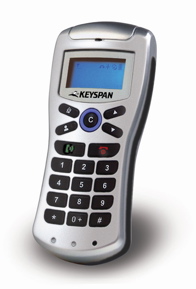
The Keyspan Cordless VoIP Phone is a light-weight, compact, full-featured telephone
that is compatible with the worldwide Skype Voice over IP system. The
rechargeable handset has a backlit screen that displays detailed information
about the status of the phone, a listing of Skype contacts, signal strength,
battery level, and more. The rechargeable Ni-MH batteries which provide up to
1200 hours of standby time, and 15 hours of talk time, are recharged using a
supplied USB cable. The phone's range extends to up to 300 feet outdoors, and
100 feet indoors. Users can take advantage of calling from their desktop
computers at home or at their business, or from their laptops when they travel.
The
phone provides a telecommunications experience similar to using a cordless
landline phone, except that it uses Voice over IP through a user's Internet-connected
Macintosh or Windows computer. Most VoIP phones do not have displays, and must
be tethered to the host PC by a USB cable. Digital publishers will appreciate
the fact that this phone will allow them to move around their environment, and
enable them to always keep the pocket-sized phone with them.
When
making a call, the user can dial directly, simply preceding the phone number
with "00" or "+". Contacts that are stored in the
user's Skype contact list appear on the phone's display, and can be scrolled
and selected. Receiving an incoming call is accomplished by pressing the
dial/answer key. The user has all of the functionality of Skype available
directly on the phone.
The
phone is easy to set-up. First it is charged by connecting the USB cable. The
wireless connection with the computer is through the use of a USB dongle that
plugs into an available USB port. When the dongle is installed the computer
senses its presence and installs the drivers, which the user has already copied
to the computer from a supplied CD-ROM. The phone and the dongle need to be
paired, so that communication can take place. This needs to be done only once.
This operation consists of pressing the connect button on the dongle, which
results in the connect LED being lit, placing the phone 10 cm from the dongle
until the connect LED blinks, and waiting five seconds for the phone's display
to show a phone-to-PC connection. The phone can now be used to make free calls
to another Skype user PC-to-PC, or low-cost calls to any phone, anywhere. $79
Contact:
Keyspan, a division of InnoSys, Inc., 3095 Richmond Parkway, Suite 207,
Richmond, CA 94806, 510 222-0131, http://www.keyspan.com,
e-mail: info@keyspan.com, fax: 510 222-0323.
Digital Video Reviews
TOKI Shot 1.2.2 (MAC/WIN)
TOKI Shot 1.2.2 is an innovative solution for generating shot lists that can be
used by picture and sound editors, music editors, musicians, and others. It
takes as input a cut digital film, automatically identifying scenes, and
listing start and stop time codes, shot length, and a user-added name,
identifier or scene description. The program can reduce significantly the
time-consuming process of breaking down a movie, TV film, documentary, or other
cinematic form so that it can be scored.
The program
interface includes a movie player with controls including a shuttle dial.
Thumbnails provide visual clues to scene changes, which can be rearranged or
deleted. The shot list shows the first and last frame of each shot, which along
with the user's annotations, makes navigation fairly foolproof.
Projects begin
by opening a movie. The main window should be familiar and comfortable for
anyone who has used a nonlinear digital editor (which this is not). The user
runs the movie through Analysis and Detection operations which, according to
the sensitivity settings determined by the user, will determine where the
various shots begin and end, and what should be the minimum shot duration (in
frames). The program applies a color to indicate the relevance of the detection
process: green indicates a high relevance, i.e. probably a cut; orange means
medium relevance; and red indicates low relevance, "probably a fade-out,
a fast camera traveling or something crossing fast [in the] camera
field." It also applies sequential numbers to them, and the user can
reorder them as well as provide names for the scenes and shots. Shots that are
not identified automatically can be added manually.
The output of
TOKI Shot can be read by music and NLE software as well as a database an word
processor. Several export options are provided as well as the option to print.
$129
Contact: Digital
Salade, 40, rue Blanche, 75009 Paris, France, 33 1 40 23 90 90, http://www.digital-salade.com, e-mail:
contact@digital-salade.com, fax: 33 1 40 23 91 91.
Road Trip Effect Pro 2.1.6
(MAC/WIN)
Road Trip Effect Pro 2.1.6 enables a video producer to generate an animation
depicting the travel of a car, plane, train, or other vehicle or object, on a
user-defined trajectory over a map or user-provided background. This effect is
commonly used in theatrically released motion pictures to show the movement of
characters from one location in the world to another, and thus effect a major
scene change. With the use of this software, users can add this effect to their
own digital movie productions.
Users
can use a timeline to control the movement of multiple trajectories, either
concurrent or sequential, with settings for the timing of the movement, the
width and transparency of the path, and the number and names of points along
the path. In this way a long and complex trip comprised of multiple legs can be
displayed. The user can review the motion as many times as necessary and then
output it to a QuickTime movie that can be edited into a vacation movie or
other production. A demo version can be downloaded at http://www.solrobots.com/roadtrip/download.html.
$24.95
Contact: Sol Robots, 512 853-9645, http://www.solrobots.com,
e-mail: sales@solrobots.com, fax: 815 550-1744.
Boinx iStopMotion DV (MAC)
Boinx iStopMotion DV enables users to produce stop motion animation and time lapse
recording. By photographing action using fixed duration fixed frames and
playing it back at normal framerates, users can see action that would normally
not be visible, or would be difficult to perceive. The program uses a video
input source, such as the Apple iSight, most FireWire DV cameras, and some USB
cameras, essentially working with any source that works with QuickTime. The
application records at a movie resolution of 720 x 576 (PAL and NTSC). $39.95
Contact: Boinx
Software, GeBE Computer & Peripherie GmbH, Mozartstrasse 14a, 82110
Germering, Germany, 49 89 84 005 333, http://www.boinx.com,
fax: +49 89 89 43 99 11 fax US: 1-866-GOBOINX, (toll free).
iVideoToGo Platinum (WIN )
iVideoToGo Platinum provides a simple three-step method to convert DVD video
content, or video from any source, to file formats that are compatible with
Apple Video iPod or PlayStation Portable (PSP). It handily processes all sorts
of popular video formats, producing high-compression output. Users select a
source, select a target, select a format, and initiate the copy process. Fast
and easy. The CopyLater Intelligent Monitoring feature enables the user to
schedule time-consuming sessions for times when the user is away from their
computer. $29.95
Contact:
InterVideo, Inc., 47350 Fremont Blvd., Fremont, CA 94538, 510 651-0888, http://www.intervideo.com, e-mail:
sales@intervideo.com, fax: 510 651-8808.
Book Reviews
Adobe InDesign CS2 one-on-one
McClelland, Deke
A book/media
package that delivers personal training via a full-color, step-by-step guide
supported by a two hour DVD-ROM produced by Total Training, and presented by
the author, publishing expert Deke McClelland.
The text is
arranged in a course fashion, and presented as if the author were teaching the
reader in a formal training environment. This is an excellent way to get guided
hands-on instruction. The book is beautifully designed and a joy to read or
skim. Any Adobe InDesign CS2 user would find something new and interesting in
this well-done volume.
Available for
on-line ordering at http://www.amazon.com/exec/obidos/redirect?tag=thekleperreporto&path=ISBN%3D0596100973
0596100973 493 pp. $44.99
Contact: O'Reilly & Associates, Inc., 1005 Gravenstein Highway North,
Sebastopol, CA 95472, 800 998-9938, 707 829-0515, http://www.oreilly.com, e-mail:
info@oreilly.com, fax: 707 829-0104.
Adobe Photoshop CS2 on Demand
Anderson, Andy; Steve Johnson
A book chock full
of one-to-two page visual tutorials showing how to accomplish various tasks
using Adobe Photoshop CS2. The full-color guide lists the step-by-step
instructions for each task; shows what to do in screen captures, photographs,
etc.; provides references to other tasks in the book; and lists relevant tips
and techniques.
The book meets the
objectives of the Adobe Certified Expert (ACE) Program and prepares the reader
to take the ACE qualification exam. Information about the program can be found
at http://www.adobe.com/support/certification/ace.html.
Available for on-line ordering at http://www.amazon.com/exec/obidos/redirect?tag=thekleperreporto&path=ISBN%3D0789733900
0789733900 524 pp. $34.99
Contact: Que Corporation, 11711 North College Ave., Carmel, IN 46032, http://www.quecorp.com.
Adobe® Acrobat® 7 in the Office
Baker, Donna L.
A guide to using
Adobe Acrobat 7 for those in business and office environments. The author
shows, through case studies, how to apply Acrobat to fulfill many
business-based communication and transaction tasks. Many Acrobat-based
activities are described in step-by-step detail supported with illustrations.
The author
maintains a companion Web site with files from the book as well as additional
content. It is located at http://www.donnabaker.ca/downloads.
Available for on-line ordering at http://www.amazon.com/exec/obidos/redirect?tag=thekleperreporto&path=ISBN%3D0321321820
0321321820 404 pp. $35
Contact: Adobe Press, Prentice Hall, 113 Sylvan Ave., Englewood Cliffs, NJ
07632
Adobe® Illustrator® CS2 Gone
Wild
Karlins, David; Bruce K. Hopkins
The authors
show, step-by-step, in exacting detail, and in full-color, with large, clear
illustrations, how to produce extraordinary vector graphic effects. They have
established a companion Web site at http://www.wiley.com/go/illustratorgonewild.
Available for on-line ordering at http://www.amazon.com/exec/obidos/redirect?tag=thekleperreporto&path=ISBN%3D0764598597
0764598597 272 pp. $34.99
Contact: John Wiley & Sons, 605 Third Ave., New York, NY 10158-0012
Adobe® Photoshop® CS2 For
Digital Photographers Only
Milburn, Ken; Doug Sahlin
Two
experienced digital photographers present a complete digital imaging workflow
process. The authors divide the book into five sections: Shooting and Improving
Photos; Non-Destructive Editing; Final Stages of the Image Editing Workflow;
Prepare Images for Final Output; and Automating Workflow. The numerous
full-color images provide clear illustrations of how to accomplish technical
operations. The text is full of useful tips and time-saving operations.
Available
for on-line ordering at http://www.amazon.com/exec/obidos/redirect?tag=thekleperreporto&path=ISBN%3D0471746894
0471746894 326 pp. $39.95
Contact: John Wiley & Sons, 605 Third Ave., New York, NY 10158-0012
Adobe® Photoshop® CS2 in 24
Hours
Rose, Carla
A text-based
course consisting of 24 one-hour step-by-step lessons covering the fundamental
skills necessary to achieve basic proficiency with Adobe Photoshop CS2. Lessons
cover skills such as compositing, masking, transformations, color adjusting,
special effects, and more.
Available for
on-line ordering at http://www.amazon.com/exec/obidos/redirect?tag=thekleperreporto&path=ISBN%3D0672327554
0672327554 514 pp. $29.99
Contact: Sams, 201 West 103rd St., Indianapolis, IN 46290.
AppleScript for Dummies, 2nd
Edition
Trinko, Tom
The
direct route to learning how to master and apply AppleScript for automating
tasks within the Mac OS environment. Readers can learn how to control
applications such as FileMaker Pro, Word, Excel, and others, and how to script
the Finder.
Available
for on-line ordering at http://www.amazon.com/exec/obidos/redirect?tag=thekleperreporto&path=ISBN%3D0764574949
0764574949 386 pp. $24.99
Contact: John Wiley & Sons, 605 Third Ave., New York, NY 10158-0012
Art of SQL,The
Faroult, Stephane; Peter Robson
The authors cleverly and
effectively compare the application of SQL to the waging of war, providing
examples of SQL "in the trenches," or, in other words, in the real
world. They follow the outline of Sun Tzu, emphasizing strategy over specfics,
and lay out a battle plan that unfolds from Chapter 1, Laying Plans, to Chapter
12, Employment of Spies.
Available for on-line ordering
at http://www.amazon.com/exec/obidos/redirect?tag=thekleperreporto&path=ISBN%3D0596008945
0596008945 367 pp. $44.99
Contact: O'Reilly & Associates, Inc., 1005 Gravenstein Highway North,
Sebastopol, CA 95472, 800 998-9938, 707 829-0515, http://www.oreilly.com, e-mail:
info@oreilly.com, fax: 707 829-0104.
Beginning REALbasic: From
Novice to Professional
Ford Jr., Jerry Lee
This
book presents the basic elements of constructing a REALbasic application from
the viewpoint of someone who is totally unfamiliar with the software. It is
first and foremost written for the novice, but has information that can get an
experienced programmer up and running very quickly in order to orient them to a
new programming environment.
The
author clearly explains the benefits of REALbasic and the potential that it has
for creating commercial applications. He shows all of the major programming
components, and provides realistic examples of how to build working
applications.
The
accompanying CD-ROM helps the reader acquire hands-on experience, which is
essential for learning to program. The disc contains the code that is presented
in various chapters and shows the versatility of the language. Some of the
projects are a desktop clock, a movie player, a word processor, a book
database, an MP3 player, and a network connection checker.
An
e-book version of the text is available to owners of the book for an additional
$10.
Available
for on-line ordering at http://www.amazon.com/exec/obidos/redirect?tag=thekleperreporto&path=ISBN%3D159059634X
159059634X 372 pp. $39.99
Contact: Apress, Inc., 2560 Ninth St., Ste. 219, Berkeley, CA 94710, 510
549-5930, http://www.apress.com, fax: 510
549-5939.
Communicating Design:
Developing Web Site Documentation for Design and Planning
Brown, Dan M.
This
book clearly defines the various ways in which information architects can
communicate effectively with their clients. The author identifies ten kinds of
deliverables that he classifies into three types: those that describe what Web
site users need; those that show what they will see; and those that describe
how the objectives will be met. The book provides an excellent framework for
planning, executing, and maintaining Web sites.
The
author maintains a book-related blog at http://www.communicatingdesign.com/.
Available for on-line ordering at http://www.amazon.com/exec/obidos/redirect?tag=thekleperreporto&path=ISBN%3D0321392353
0321392353 352 pp. $39.99
Contact: New Riders Publishing, 201 West 103rd St., Indianapolis, IN 46290.
Complete
Book of Mac OS X Shortcuts: Desktop Reference Guide, The
Pirera, Dean
All
experienced digital publishers know that keeping their hands on their keyboard
is the most efficient way to work. Every time that a user reaches for his or
her mouse they lose valuable production time. Now comes an essential guide to
over 1500 Mac OS X keyboard shortcuts for such invaluable applications as
Photoshop CS, Microsoft Word, and the Macintosh OS. The book is a wonderful
reference source. $25
0646463519
154 pp. $25
Contact: AppleCore Solutions,
P.O. Box 767, Byron Bay, NSW 2481 Australia, 02 6687 0653, http://www.applecoresolutions.com.au.
Create Your Own Digital Movies
Strayer, Pam
The author
provides five simple video production projects that aid the reader in producing
their own digital movies. The accompanying CD-ROM contains all of the Windows
software necessary to begin the process.
Available for
on-line ordering at http://www.amazon.com/exec/obidos/redirect?tag=thekleperreporto&path=ISBN%3D0672328348
0672328348 167 pp. $19.99
Contact: Sams, 201 West 103rd St., Indianapolis, IN 46290.
Creating a Web Site with
Flash: Visual QuickProject
Morris, David
A
short, concise, full-color, step-by-step guide to implementing Flash technology
on a Web site. The directions are clear and easily applied.
Available
for on-line ordering at http://www.amazon.com/exec/obidos/redirect?tag=thekleperreporto&path=ISBN%3D0321321251
0321321251 140 pp. $12.99
Contact: Peachpit Press, 1249 8th St., Berkeley, CA 94710, 800 283-9444, http://www.peachpit.com, fax: 510 524-2221.
CSS: The Missing Manual
McFarland, David Sawyer
The author provides
dozens of hands-on tutorials and real-world exercises that can lead the reader
to an understanding of how to apply Cascading Style Sheets to their Web sites.
The techniques can not only provide more sophisticated page layout and
structure, but can produce code that loads faster and is easier to maintain and
update.
The author gets the
reader involved immediately with more than 100 pages of hands-on page-building
tutorials. HTML, within the context of CSS, is introduced for those who are
unfamiliar with the language. Experienced Web page designers will see HTML in a
new context, and benefit from the review.
Available for on-line
ordering at http://www.amazon.com/exec/obidos/redirect?tag=thekleperreporto&path=ISBN%3D0596526873
0596526873 476 pp. $34.99
Contact: O'Reilly & Associates, Inc., 1005 Gravenstein Highway North,
Sebastopol, CA 95472, 800 998-9938, 707 829-0515, http://www.oreilly.com, e-mail:
info@oreilly.com, fax: 707 829-0104.
Designer's Guide to Mac OS X
Tiger
Gamet, Jeff
A nicely
designed, full-color guide to using Mac OS X Tiger in a prepress environment.
The author addresses many potential problems that designers are likely to
encounter in areas such as fonts, printing, PDF, color management, networking,
maintenance, security, and more.
Available
for on-line ordering at http://www.amazon.com/exec/obidos/redirect?tag=thekleperreporto&path=ISBN%3D032141246X
032141246X 280 pp. $29.99
Contact: Peachpit Press, 1249 8th St., Berkeley, CA 94710, 800 283-9444, http://www.peachpit.com, fax: 510 524-2221.
Designing with Web
Standards, Second Edition
Zeldman, Jeffrey
This
is the definitive source on applying standards for Web implementation across a
variety of browsers. The full-color book covers topics such as site
obsolescence; standards problems; findability, syndication, blogs, and
podcasts; modern mark-up; XHML restructuring the Web; structure and
meta-structure; CSS basics; working with browsers; typography; accessibility
basics; working with DOM-based scripts; and more.
Available
for on-line ordering at http://www.amazon.com/exec/obidos/redirect?tag=thekleperreporto&path=ISBN%3D0321385551
0321385551 410 pp. $44.99
Contact: New Riders Publishing, 201 West 103rd St., Indianapolis, IN 46290.
Don't Make Me Think, Second
Edition
Krug, Steve
The
author, a Web usability expert, has written a short guide that is sure to have
a positive impact on Web site designers, regardless of their talent or
experience. He shows, in clear examples, how to make Web site design obvious to
the point where the user need not think about how they will navigate and gain
some benefit from their site visit.
This
second edition adds three new chapters dealing with why people leave Web sites,
how to make sites usable and accessible, and how to survive executive design
whims.
Available
for on-line ordering at http://www.amazon.com/exec/obidos/redirect?tag=thekleperreporto&path=ISBN%3D0321344758
0321344758 201 pp. $35
Contact: New Riders Publishing, 201 West 103rd St., Indianapolis, IN 46290.
Enemy at the Water Cooler
Contos, Brian T.
The greatest threat to
the security of an enterprise can come from within. Company insiders have the
knowledge to sabotage the networks, computers, and applications, often without
detection. Such attacks can severely cripple a business and bring it to a halt.
The author exposes where these risks reside, and tells what steps can be taken
to prevent such assaults on company information and resources. Awareness of the
possibility of the threats is the first step in preventing them. By recounting
a series of real-life case studies, the author describes the insider, the type
of organization, the nature of the attack, and how the organization responded.
This kind of information can be of vital importance to those who are charged
with the security of an enterprise.
Purchase of the book
entitles the buyer to register for a free Solutions Membership at http://www.syngress.com and access four free
e-booklets.
Available for on-line ordering at http://www.amazon.com/exec/obidos/redirect?tag=thekleperreporto&path=ISBN%3D1597491292
1597491292 262 pp. $49.95
Contact: Syngress Publishing, Inc., 800 Hingham St., Rockland, MA 02370, http://www.syngress.com. Distributed by
O'Reilly Media, Inc. in the United States and Canada.
Excel for Starters, The
Missing Manual
MacDonald, Matthew
A
clearly written and illustrated guide to Microsoft Excel 2002 and 2003. The
author provides information on all aspects of the program with many tips and
notes that provide insight into getting the most from the application.
Available
for on-line ordering at http://www.amazon.com/exec/obidos/redirect?tag=thekleperreporto&path=ISBN%3D0596101546
0596101546 380 pp. $19.95
Contact: O'Reilly & Associates, Inc., 1005 Gravenstein Highway North,
Sebastopol, CA 95472, 800 998-9938, 707 829-0515, http://www.oreilly.com, e-mail:
info@oreilly.com, fax: 707 829-0104.
Final Cut Express HD:
Digital Video Editing for Everyone
Weynand, Diana
This
is the Apple-certified method of learning how to use Final Cut Express HD 3.5.
The book is a learn-as-you-go course, with each chapter consisting of hands-on
projects, leading ultimately to basic skill building. Each chapter includes
lesson review questions and answers. The companion DVD-ROM contains all of the
project files, and a companion Web site is available at http://www.peachpit.com/apt.fceHD.
Available for on-line ordering at http://www.amazon.com/exec/obidos/redirect?tag=thekleperreporto&path=ISBN%3D0321335333
0321335333 483 pp. $44.99
Contact: Peachpit Press, 1249 8th St., Berkeley, CA 94710, 800 283-9444, http://www.peachpit.com, fax: 510 524-2221.
Google Hacks: Tips
& Tools for Finding and Using the World's Information, Third Edition
Dornfest, Rael; Paul Bausch, Tara Claishain
The
latest tips and techniques to master, manipulate, and manage the wealth of
services and information that is available through Google. Readers learn how to
become power searchers, exploring all of Google's applications and services.
Among the things that the authors explain (that you probably didn't know) are:
how to convert a Google query into an RSS feed that can be monitored in any
newsreader; how to use Gmail as an external hard drive for Linus, Mac, or
Windows; how to build a customized Google Map and add it to your Web site; and
more.
A
number of sample hacks are available on-line at no-cost at http://www.oreilly.com/catalog/googlehks3/chapter/index.html.
Available for on-line ordering at http://www.amazon.com/exec/obidos/redirect?tag=thekleperreporto&path=ISBN%3D0596527063
0596527063 510 pp. $24.99
Contact: O'Reilly & Associates, Inc., 1005 Gravenstein Highway North,
Sebastopol, CA 95472, 800 998-9938, 707 829-0515, http://www.oreilly.com, e-mail:
info@oreilly.com, fax: 707 829-0104.
Hillman Curtis on
Creating Short Films for the Web
Curtis, Hillman
The
author is a recognized award-winning Web site designer who has produced work
for some of the biggest names in the digital world: Adobe, Intel, Yahoo!, and
others. In this book he gives his personal insights into the production of nine
projects that he has produced. Each project uses a short video (from 60 seconds
to ten minutes) to communicate the heart of his subject matter. This insider's
book is an eye-opening view of how the creative process works.
Available
for on-line ordering at http://www.amazon.com/exec/obidos/redirect?tag=thekleperreporto&path=ISBN%3D0321278917
0321278917 228 pp. $34.99
Contact: New Riders Publishing, 201 West 103rd St., Indianapolis, IN 46290.
How to Do Everything with
Dreamweaver 8
Meadhra, Michael
A book
that serves either as a reference or a tutorial. New users can follow the
chapters to become skilled at using every aspect of the Dreamweaver program.
Dreamweaver users can use the extensive index and tabbed chapter indicators to
quickly locate just the information that they require.
Available
for on-line ordering at http://www.amazon.com/exec/obidos/redirect?tag=thekleperreporto&path=ISBN%3D0072262389
0072262389 460 pp. $24.99
Contact: Osborne McGraw-Hill, 2100 Powell St., 10th Floor, Emeryville, CA
94608, 510 549-6600, http://www.osborne.com,
fax: 510 549-6603.
How to do Everything with
Mac OS X Tiger
McElhearn, Kirk
Readers
who are new to the Apple Macintosh OS X Tiger operating system will find this
book useful as a guide to the features inherent in this OS. The author
introduces capabilities that relate both to the host computer and to connecting
with the outside world, including synching to the iPod.
Available
for on-line ordering at http://www.amazon.com/exec/obidos/redirect?tag=thekleperreporto&path=ISBN%3D0072261587
0072261587 489 pp. $24.99
Contact: Osborne McGraw-Hill, 2100 Powell St., 10th Floor, Emeryville, CA
94608, 510 549-6600, http://www.osborne.com,
fax: 510 549-6603.
How to Do Everything with
Photoshop CS2
Smith, Colin
This
attractive full-color book covers the complete range of topics that new Adobe
Photoshop CS 2 users need to know. The author includes all of the tools, menus,
palettes, and other interface details that are crucial for mastery. Advanced
topics include channels, retouching, special effects, preparation for the Web,
and more. The Behind the Scenes section details various techniques developed by
Photoshop professionals.
Available
for on-line ordering at http://www.amazon.com/exec/obidos/redirect?tag=thekleperreporto&path=ISBN%3D0072261609
0072261609 420 pp. $29.99
Contact: Osborne McGraw-Hill, 2100 Powell St., 10th Floor, Emeryville, CA
94608, 510 549-6600, http://www.osborne.com,
fax: 510 549-6603.
HTML Utopica: Designing
without Tables Using CSS
Andrew, Rachel; Dan Shafer
An
important book for Web masters who generally rely on tables for establishing
their page designs. Through the use of CSS (Cascading Style Sheets), Web page
designers can layout pages that load faster and are considerably easier to
maintain and update. CSS separates the page content from its layout. By so
doing the page author can control the typestyles, fonts, colors, margins,
spacing, position, etc. without affecting the content. By using 1-, 2-, and
3-column CSS layouts readers can leave their dependence on table-based design
and become more efficient and productive.
The
first four chapters of the book are available, free of charge, at the book's
Web site: http://www.sitepoint.com/books/css2/.
Available for on-line ordering at http://www.amazon.com/exec/obidos/redirect?tag=thekleperreporto&path=ISBN%3D0975240277
0975240277 497 pp. $39.95
Contact: SitePoint Pty. Ltd., 424 Smith Street Collingwood, VIC Australia
3066, http://www.sitepoint.com, e-mail:
business@sitepoint.com.
Illustrator CS2 for
Windows & Macintosh Visual QuickStart Guide
Weinmann, Elaine; Peter Lourekas
The
most comprehensive Adobe Illustrator CS2 "how to" that we have
seen. Virtually every Illustrator capability is demonstrated in this hefty
book. Each feature is explained clearly and its execution is listed
step-by-step along with clear figures. The book can serve as a text or a
reference. A full-color insert shows stunningly beautiful and sophisticated
drawing work produced by illustration professionals.
Available
for on-line ordering at http://www.amazon.com/exec/obidos/redirect?tag=thekleperreporto&path=ISBN%3D0321336569
0321336569 583 pp. $24.99
Contact: Peachpit Press, 1249 8th St., Berkeley, CA 94710, 800 283-9444, http://www.peachpit.com, fax: 510 524-2221.
Inside/Outside: From the
Basics to the Practice of Design, Second Edition
Grear, Malcolm
A
monumental work exhibiting the design world of Malcolm Grear, who has been a
working artist, lecturer, teacher, and author. The book, which is itself an
exemplar of fine design, is a fascinating insight into the creative environment
of a master designer, illuminating the process of defining problems and
creating design solutions. Select pages from the book can be seen at Mr.
Grear's Web site: http://www.mgrear.com.
Available for on-line ordering at http://www.amazon.com/exec/obidos/redirect?tag=thekleperreporto&path=ISBN%3D0321440676
0321440676 351 pp. $45
Contact: New Riders Publishing, 201 West 103rd St., Indianapolis, IN 46290.
Internet Forensics
Jones, Robert
An interesting and useful
guide to using forensic techniques to investigate fraud and scams on the
Internet. Using methods described in the book, users can determine the source of
spam and other online irritants and deceptions.
A sample chapter entitled
"Obfuscation," is available online at http://www.oreilly.com/catalog/internetforensics/chapter/index.html.
Available for on-line ordering at http://www.amazon.com/exec/obidos/redirect?tag=thekleperreporto&path=ISBN%3D059610006X
059610006X 223 pp. $39.95
Contact: O'Reilly & Associates, Inc., 1005 Gravenstein Highway North,
Sebastopol, CA 95472, 800 998-9938, 707 829-0515, http://www.oreilly.com, e-mail:
info@oreilly.com, fax: 707 829-0104.
Learning PHP & MySQL
Davis, Michele E.; Jon A. Phillips
The use of PHP and MySQL
can move a static Web site to a contemporary interactive site. The authors
cover the use of Apache, PHP, and MySQL and introduce programming concepts that
are necessary for understanding how to implement the technologies.
Available for on-line
ordering at http://www.amazon.com/exec/obidos/redirect?tag=thekleperreporto&path=ISBN%3D0596101104
0596101104 359 pp. $29.99
Contact: O'Reilly & Associates, Inc., 1005 Gravenstein Highway North,
Sebastopol, CA 95472, 800 998-9938, 707 829-0515, http://www.oreilly.com, e-mail:
info@oreilly.com, fax: 707 829-0104.
Learning SQL
Beaulieu, Alan
The author has written a
comprehensive yet approachable introduction to the use of SQL as an interface
to access relational databases. The prevalence of relational databases makes an
understanding of SQL more important than ever.
In order to use SQL the user must
have access to a database. The author uses MySQL, a widely used relational
database application, to present the process of building a database and
demonstrating how to use SQL to access it.
Free access to Chapter 3,
"Query Primer," is available at: http://www.oreilly.com/catalog/learningsql/chapter/index.html.
Available for on-line ordering at http://www.amazon.com/exec/obidos/redirect?tag=thekleperreporto&path=ISBN%3D0596007272
0596007272 289 pp. $34.95
Contact: O'Reilly & Associates, Inc., 1005 Gravenstein Highway North,
Sebastopol, CA 95472, 800 998-9938, 707 829-0515, http://www.oreilly.com, e-mail:
info@oreilly.com, fax: 707 829-0104.
Mac Annoyances
Rizzo, John
The author identifies a large collection
of annoyances that tend to plague many Macintosh users, and provides solutions,
tips, suggestions, tricks, and workarounds. A sample chapter, "iPod
Annoyances," is available online at http://www.oreilly.com/catalog/macannoy/chapter/index.html.
Available for on-line ordering at http://www.amazon.com/exec/obidos/redirect?tag=thekleperreporto&path=ISBN%3D059600723X
059600723X 156 pp. $24.95
Contact: O'Reilly & Associates, Inc., 1005 Gravenstein Highway North,
Sebastopol, CA 95472, 800 998-9938, 707 829-0515, http://www.oreilly.com, e-mail:
info@oreilly.com, fax: 707 829-0104.
Mac OS X 10.4 Tiger
Williams, Robin
A learn-along series of
lessons aimed at bringing the reader up-to-speed quickly on the major features
of Apple Macintosh OS X 10.4 Tiger. This book, by Mac cult favorite Robin
Williams, shows, in full-color illustrations, and tells, through easy to read
text, how to perform the tasks that are at the heart of the operating system.
Available for on-line
ordering at http://www.amazon.com/exec/obidos/redirect?tag=thekleperreporto&path=ISBN%3D0321330226
0321330226 432 pp. $29.99
Contact: Peachpit Press, 1249 8th St., Berkeley, CA 94710, 800 283-9444, http://www.peachpit.com, fax: 510 524-2221.
.Mac with iWeb Visual
QuickStart Guide, Second Edition
Reynolds, David
Everything
that a .Mac user needs to know about publishing their content using Apple iWeb.
Using numerous screen captures and step-by-step instructions, the reader is
shown how to accomplish all .Mac capabilities, such as Apple Mail, iDisk,
HomePage, .Mac Groups, .Mac Sync, and .Mac Bookmarks, as well as using .Mac
with other Apple applications, such as iPhoto, Backup, and, of course, iWeb.
Available
for on-line ordering at http://www.amazon.com/exec/obidos/redirect?tag=thekleperreporto&path=ISBN%3D0321442288
0321442288 320 pp. $21.99
Contact: Peachpit Press, 1249 8th St., Berkeley, CA 94710, 800 283-9444, http://www.peachpit.com, fax: 510 524-2221.
Macromedia Dreamweaver 8
Visual Encyclopedia
Cavanaugh, Kim; Sheri German
This is
an exceptional complement to the Dreamweaver 8 software application, provided
in two parts. Part I provides a full-color encyclopedic reference to every
Dreamweaver tool, with a complete, illustrated explanation of how to use it.
Part II consists of step-by-step instructions for accomplishing more than 140
program-related tasks and techniques. The alphabetical listings, along with the
complete index, and tabbed, color-coded pages, makes the book a handy and
useful reference.
Dreamweaver
8 users are likely to find the book a fascinating exposé of how the program
works, and how the user can apply its functionality and power.
Available
for on-line ordering at http://www.amazon.com/exec/obidos/redirect?tag=thekleperreporto&path=ISBN%3D0471751766
0471751766 468 pp. $39.99
Contact: John Wiley & Sons, 605 Third Ave., New York, NY 10158-0012
Macromedia Studio 8:
Training from the Source
Bardzell, Shaowen; Jeffrey Bardzell
The
authors provide approximately 20 hours of self-guided tutorials that cover most
of the Macromedia Studio suite. Major sections include: Fireworks, Dreamweaver,
Flash, Dreamweaver and Flash, Dreamweaver and ColdFusion, and Flash and
ColdFusion.
The
accompanying cross-platform Mac and Windows CD includes all of the project
files described in the text.
Available
for on-line ordering at http://www.amazon.com/exec/obidos/redirect?tag=thekleperreporto&path=ISBN%3D0321336208
0321336208 543 pp. $44.99
Contact: Adobe Press, Prentice Hall, 113 Sylvan Ave., Englewood Cliffs, NJ
07632
Master Visually®
Macromedia® Dreamweaver® 8 and Flash® 8
Etheridge, Denise; Janet Valade
This
visually-based book consists of eight parts: Dreamweaver Basics, Adding Design
Elements, Advanced Dreamweaver Features, Creating a Dynamic Site, Mastering
Flash Basics, Building Your Flash Movie, Adding Finishing Touches, and Building
Interactive Elements with ActionScript. Each one- to two-page spread addresses
a specific task, such as Publishing a Dreamweaver Site or Install the PHP
Application Server. The tasks generally begin with an introduction or
explanation, followed by a numbered set of instructions which are supported
with screen captures showing the reader how their screen should look. The tasks
often include a "Master It" section which contains more advanced
information.
The
accompanying cross-platform CD-ROM contains trial versions of Dreamweaver 8,
Flash Professional 8, and Fireworks 8, as well as all of the sample files shown
in the book.
Available
for on-line ordering at http://www.amazon.com/exec/obidos/redirect?tag=thekleperreporto&path=ISBN%3D0471776181
0471776181 650 pp. $34.99
Contact: John Wiley & Sons, 605 Third Ave., New York, NY 10158-0012
MySpace Unraveled: A
Parent's Guide to Teen Social Networking
Magid, Larry; Anne Collier
An
essential guide for parents whose children are active in the on-line community
of MySpace.com. The authors provide an insider look at how the social
networking community works, how it can be dangerous, and what to do to help
protect children. Readers are provided with detailed instructions for
establishing their own MySpaces account and learning first-hand what the
on-line experience is like.
Available
for on-line ordering at http://www.amazon.com/exec/obidos/redirect?tag=thekleperreporto&path=ISBN%3D032148018X
032148018X 184 pp. $14.99
Contact: Peachpit Press, 1249 8th St., Berkeley, CA 94710, 800 283-9444, http://www.peachpit.com, fax: 510 524-2221.
Non-Designer's Type Book,
The; Second Edition
Williams, Robin
The
author provides guidelines, insights, and techniques that will likely help the
reader become a more competent designer and user of type. Each chapter provides
a brief introduction to a typographic principle or technique, illustrated with
numerous examples.
Available
for on-line ordering at http://www.amazon.com/exec/obidos/redirect?tag=thekleperreporto&path=ISBN%3D0321303369
0321303369 240 pp. $24.99
Contact: Peachpit Press, 1249 8th St., Berkeley, CA 94710, 800 283-9444, http://www.peachpit.com, fax: 510 524-2221.
Official Adobe Print
Publishing Guide, The; Second Edition
Lawler, Brian P.
Few
books have dealt with the process of contemporary commercial print production,
and none have done it as well as this. The entire printing production workflow
is clearly explained and colorfully illustrated, without intimidating the
reader nor talking down to him or her. The book is concise yet comprehensive
and worthy of the name "Adobe."
Available
for on-line ordering at http://www.amazon.com/exec/obidos/redirect?tag=thekleperreporto&path=ISBN%3D0321304667
0321304667 191 pp. $45
Contact: Adobe Press, Prentice Hall, 113 Sylvan Ave., Englewood Cliffs, NJ
07632
Photoshop Anthology, The
Haffly, Corrie
This full-color book
provides something of an apprenticeship for Photoshop users who want to learn
some of the insider techniques and methods for using Photoshop effectively in
creating Web interfaces, manipulating images, and executing related tasks. The
author presents 101 step-by-step procedures accompanied by clear illustrations,
that are useful to Web site developers.
Available for on-line
ordering at http://www.amazon.com/exec/obidos/redirect?tag=thekleperreporto&path=ISBN%3D0975841920
0975841920 278 pp. $39.95
Contact: SitePoint Pty. Ltd., 424 Smith Street Collingwood, VIC Australia
3066, http://www.sitepoint.com, e-mail:
business@sitepoint.com.
Photoshop CS2 Gone Wild
London, Sherry
This full-color, heavily
illustrated book, contains 50 wild and crazy effects that can be accomplished
using Adobe Photoshop CS2. The author shows in detail how to apply advanced
Photoshop tools and commands to produce amazing visual effects. The
accompanying CD-ROM has all of the files shown in the book so that the reader
can practice on their own.
Available for on-line
ordering at http://www.amazon.com/exec/obidos/redirect?tag=thekleperreporto&path=ISBN%3D0764598139
0764598139 400 pp. $34.99
Contact: John Wiley & Sons, 605 Third Ave., New York, NY 10158-0012
Photoshop CS2 Killer Tips
Kelby, Scott; Felix Nelson
This full-color book is
chock full of helpful insider tips that are certain to help Photoshop users
become more efficient and productive. The authors include tips for using Adobe
Bridge.
Available for on-line
ordering at http://www.amazon.com/exec/obidos/redirect?tag=thekleperreporto&path=ISBN%3D0321330633
0321330633 261 pp. $29.99
Contact: New Riders Publishing, 201 West 103rd St., Indianapolis, IN 46290.
Photoshop Elements 5: The
Missing Manual
Brundage, Barbara
This
hefty full-color volume provides an impressive number of insider tips and
tricks, along with instructions for accomplishing many tasks related to
improving digital images. The author explains all of the tools and menu
options. Much of the content is of use to any Photoshop Elements 5 user,
although the hobbyist and scrapbooker will find information of special
interest.
A
podcast with the author can be heard at http://www.oreillynet.com/pub/a/network/2006/09/12/barbara-brundage-interview-ps-elements5.html.
Available for on-line ordering at http://www.amazon.com/exec/obidos/redirect?tag=thekleperreporto&path=ISBN%3D0596527284
0596527284 574 pp. $39.99
Contact: O'Reilly & Associates, Inc., 1005 Gravenstein Highway North,
Sebastopol, CA 95472, 800 998-9938, 707 829-0515, http://www.oreilly.com, e-mail:
info@oreilly.com, fax: 707 829-0104.
Photoshop® CS2 Speed Clinic, The
Kloskowski, Matt
A collection
of slick tricks used by Photoshop pros as compiled by Matt Kloskowski,
Education and Curriculum Developer for the National Association of Photoshop
Professionals. The author shows how to automate an imaging workflow using the
Adobe Bridge, actions, batch processing, smart objects, scripting, and more.
Available for
on-line ordering at http://www.amazon.com/exec/obidos/redirect?tag=thekleperreporto&path=ISBN%3D0321441656
0321441656 238 pp. $34.99
Contact: Peachpit Press, 1249 8th St., Berkeley, CA 94710, 800 283-9444, http://www.peachpit.com, fax: 510 524-2221.
PHP Cookbook, Second Edition
Trachtenberg, Adam; David Sklar
PHP is among the
most popular Web scripting language available today. It is estimated that it is
used on more than twenty million sites, providing interactivity via its
capability to converse with several different database applications. The
authors provide more than 250 PHP recipes covering a wide variety of topics
that are of interest to PHP programmers. This handy reference will likely save
programmers hours of work since the recipes can often be used with little
modification.
Available for
on-line ordering at http://www.amazon.com/exec/obidos/redirect?tag=thekleperreporto&path=ISBN%3D0596101015
0596101015 810 pp. $44.99
Contact: O'Reilly & Associates, Inc., 1005 Gravenstein Highway North,
Sebastopol, CA 95472, 800 998-9938, 707 829-0515, http://www.oreilly.com, e-mail:
info@oreilly.com, fax: 707 829-0104.
Process Improvement Essentials
Persse, James R.
The author
provides insight into the three leading process improvement programs: ISO
9001:2000 Quality Standard from the International Standards Organizatin (ISO),
Capability Maturity Model Integration (CMMI) from the Software Engineering
Institute, and Six Sigma. He leads the reader to a determination of which one,
or combination, of these programs may be the right one for their company. The
book is a valuable aid for managers in need of controlling the predictability
of their operation. Available for on-line ordering at http://www.amazon.com/exec/obidos/redirect?tag=thekleperreporto&path=ISBN%3D0596102178
0596102178 334 pp. $44.99
Contact: O'Reilly & Associates, Inc., 1005 Gravenstein Highway North,
Sebastopol, CA 95472, 800 998-9938, 707 829-0515, http://www.oreilly.com, e-mail:
info@oreilly.com, fax: 707 829-0104.
Programming Atlas
Wenz, Christian
Atlas is the shortened name for
Microsoft's ASP.NET Atlas, a set of technologies that provides .NET developers
with many of the same benefits for Ajax technologies that ASP.NET provides for
server side development.
The author examines how Ajax
technologies work, and shows how those technologies work. He continues with
methodologies for the reader to apply the technologies, and provides many
examples demonstrating the essential aspects of the Atlas framework.
Available for on-line ordering
at http://www.amazon.com/exec/obidos/redirect?tag=thekleperreporto&path=ISBN%3D0596526725
0596526725 382 pp. $34.99
Contact: O'Reilly & Associates, Inc., 1005 Gravenstein Highway North,
Sebastopol, CA 95472, 800 998-9938, 707 829-0515, http://www.oreilly.com, e-mail:
info@oreilly.com, fax: 707 829-0104.
Programming Python, Third
Edition
Lutz, Mark
This massive
volume covers the language syntax and programming techniques for the Python 2.5
language. Written for the experienced Python programmer, the book provides
insight into applying Python for tasks related to GUIs, databases, parallel
processing, networked applications, and the Internet.
Available
for on-line ordering at http://www.amazon.com/exec/obidos/redirect?tag=thekleperreporto&path=ISBN%3D0596009259
0596009259 1551 pp. $59.99
Contact: O'Reilly & Associates, Inc., 1005 Gravenstein Highway North,
Sebastopol, CA 95472, 800 998-9938, 707 829-0515, http://www.oreilly.com, e-mail:
info@oreilly.com, fax: 707 829-0104.
Real World Adobe InDesign
CS2 Industrial-Strength Page-Layout Techniques
Kvern, Olav Martin; David Blatner
This is
the book for practicing professionals who rely on Adobe InDesign CS2 for
Macintosh and Windows in a production environment. The authors address
virtually all of the technical aspects of using the page layout application for
print and cross-media publishing work. Readers will benefit from the many tips,
tricks, and insights that the authors provide.
The
comprehensive index provides access to thousands of listings that can lead a
reader to a particular procedure or information about a specific task. In this
way the book serves as an excellent bookshelf reference.
A
full-color insert illustrates important concepts such as trapping, overprints
and knockouts, and special imaging effects.
Available
for on-line ordering at http://www.amazon.com/exec/obidos/redirect?tag=thekleperreporto&path=ISBN%3D0321322029
0321322029 867 pp. $49.99
Contact: Adobe Press, Prentice Hall, 113 Sylvan Ave., Englewood Cliffs, NJ
07632
Real World Adobe®
Creative Suite 2 Industrial-Strength Production Techniques
Cohen, Sandee; Steve Werner
Two
seasoned graphic arts professionals lead the reader through the complexities of
the Adobe Creative Suite 2, showing how to leverage the strengths of Photoshop,
Illustrator, InDesign, Acrobat, and GoLive. Rather than concentrate on teaching
how to use each of the applications, the authors demonstrate how to use the
programs synergistically, moving between them, and automating repetitive
operations and tasks.
Digital
publishers who only want to buy one CS2 book should seriously consider this
one.
Available
for on-line ordering at http://www.amazon.com/exec/obidos/redirect?tag=thekleperreporto&path=ISBN%3D0321334124
0321334124 694 pp. $49.99
Contact: Peachpit Press, 1249 8th St., Berkeley, CA 94710, 800 283-9444, http://www.peachpit.com, fax: 510 524-2221.
RealWorld Mac OS X Fonts:
Industrial-Strength Techniques
Aker, Sharon Zardetto
This
book deals with every aspect of font use and management. It is highly useful
for digital publishers who depend on reliable font performance in a Macintosh
production environment. The author shows how to deal with font problems and
apply methods and procedures to ensure trouble-free operation. Readers will
also learn how to deal with cross-platform font issues, how to access special
characters, how to utilize legacy fonts, and much more.
Available
for on-line ordering at http://www.amazon.com/exec/obidos/redirect?tag=thekleperreporto&path=ISBN%3D0321474015
0321474015 328 pp. $39.99
Contact: Peachpit Press, 1249 8th St., Berkeley, CA 94710, 800 283-9444, http://www.peachpit.com, fax: 510 524-2221.
Relational Database
Dictionary, The
Date, C. J.
Written by
a renown pioneer in the field of relational database technology, this handy
pocket-sized reference contains complete and authoritative definitions of more
than 600 terms.
Available
for on-line ordering at http://www.amazon.com/exec/obidos/redirect?tag=thekleperreporto&path=ISBN%3D0596527985
0596527985 113 pp. $14.99
Contact: O'Reilly & Associates, Inc., 1005 Gravenstein Highway North,
Sebastopol, CA 95472, 800 998-9938, 707 829-0515, http://www.oreilly.com, e-mail: info@oreilly.com,
fax: 707 829-0104.
Ruby Cookbook
Carlson, Lucas; Leonard Richardson
Here is the definitive book on
implementing Ruby, covering such important topics as strings and numbers,
arrays and hashes, databases, graphics, and multitasking. The authors have put
together an incredible collection of ready-to-use solutions, clearly
documented, with all necessary code. Programmers can get a head start by simply
dropping code from the book into their work.
Available for on-line ordering at http://www.amazon.com/exec/obidos/redirect?tag=thekleperreporto&path=ISBN%3D0596523696
0596523696 873 pp. $49.99
Contact: O'Reilly & Associates, Inc., 1005 Gravenstein Highway North,
Sebastopol, CA 95472, 800 998-9938, 707 829-0515, http://www.oreilly.com, e-mail:
info@oreilly.com, fax: 707 829-0104.
Sandy Berger's Great Age
Guide to Gadgets & Gizmos
Berger, Sandy
This
guide is chock full of interesting, fun, labor-saving, and useful items for
entertainment, communication, travel, work, and health. Although several may be
familiar to the technically aware, many are likely to be new and and worth
reading about.
Available
for on-line ordering at http://www.amazon.com/exec/obidos/redirect?tag=thekleperreporto&path=ISBN%3D0789734419
0789734419 242 pp. $19.99
Contact: Que Corporation, 11711 North College Ave., Carmel, IN 46032, http://www.quecorp.com.
Secrets of Podcasting,
Second Edition
Farkas, Bart G.
The
entire podcasting process, from planning and executing a podcast, to recording
and listening to published podcasts, is contained in this comprehensive,
full-color book. The author covers all of the software, hardware, and Web
resources available, giving his recommendations and insights. He includes
personal interviews with podcasting celebrities and innovators. Both Macintosh
and Windows users are likely to gain confidence in publishing and distributing
their podcasts by reading this book.
Available
for on-line ordering at http://www.amazon.com/exec/obidos/redirect?tag=thekleperreporto&path=ISBN%3D0321438434
0321438434 300 pp. $24.99
Contact: Peachpit Press, 1249 8th St., Berkeley, CA 94710, 800 283-9444, http://www.peachpit.com, fax: 510 524-2221.
Stephen Johnson on Digital
Photography
Johnson, Stephen
A master
of the image-making process, Stephen Johnson shows the reader how to develop an
"eye" for composing masterful images. Johnson leads the reader
through the basics of the digital photography technology and shows how to
reproduce images in the highest level of quality.
The many
photographs, reproduced in both full color and black-and-white, have been
printed on high quality glossy paper, making the book an exemplar of the
quality that can be achieved using digital tools. This is both a course on the
art of image-making and a beautiful coffee table book.
Available
for on-line ordering at http://www.amazon.com/exec/obidos/redirect?tag=thekleperreporto&path=ISBN%3D059652370x
059652370x 320 pp. $39.99
Contact: O'Reilly & Associates, Inc., 1005 Gravenstein Highway North,
Sebastopol, CA 95472, 800 998-9938, 707 829-0515, http://www.oreilly.com, e-mail:
info@oreilly.com, fax: 707 829-0104.
Switching to the Mac: The
Missing Manual, Tiger Edition
Pogue, David; Adam Goldstein
The
authors introduce the Apple Macintosh OS to Windows users and show how to make
the transition painlessly. The reader is shown how doing things on the Mac
relate to how they were done in Windows; how to replicate Windows applications
on the Mac; how to move data and resources from Windows to the Mac; and more.
A
sample chapter, "Five Ways to Transfer Your Files," is available at
no cost at http://www.oreilly.com/catalog/switchmacmm2/chapter/index.html.
Available for on-line ordering at http://www.amazon.com/exec/obidos/redirect?tag=thekleperreporto&path=ISBN%3D0596006608
0596006608 520 pp. $24.95
Contact: O'Reilly & Associates, Inc., 1005 Gravenstein Highway North,
Sebastopol, CA 95472, 800 998-9938, 707 829-0515, http://www.oreilly.com, e-mail:
info@oreilly.com, fax: 707 829-0104.
Teach Yourself Visually:
Macromedia Dreamweaver 8
Warner, Janine
This
book is perfect for the visual learner who wants to learn the fundamental
operation of Macromedia Dreamweaver 8. The author provides more than 120
two-page spreads, each with colorful screen shots and step-by-step
instructions. The reader is led through the process of performing the essential
tasks that can result in mastery of the software.
Available
for on-line ordering at http://www.amazon.com/exec/obidos/redirect?tag=thekleperreporto&path=ISBN%3D0764599984
0764599984 304 pp. $24.99
Contact: John Wiley & Sons, 605 Third Ave., New York, NY 10158-0012
Ted Landau's Mac OS X
Help Line, Tiger Edition
Landau, Ted; Dan Frakes
The
Macintosh is known for its ease of use, but when something doesn't work right,
the user may be on their own to solve it. This book is an incredibly useful,
even essential, desktop reference for everything related to the Macintosh OS X
Tiger Edition. It is the first line of defense for troubleshooting Macintosh
problems, and for learning the correct way to install and maintain networks,
routers, wireless connections, and to perform other technical tasks.
The
authors do a great job of showing readers how to deal with the underlying Unix
system, and how to execute common commands.
The
author maintains a Web site (http://www.macosxhelpline.com/)
which has updates and a listing of the utilities mentioned in the book.
Available for on-line ordering at http://www.amazon.com/exec/obidos/redirect?tag=thekleperreporto&path=ISBN%3D0321334299
0321334299 1176 pp. $49.99
Contact: Peachpit Press, 1249 8th St., Berkeley, CA 94710, 800 283-9444, http://www.peachpit.com, fax: 510 524-2221.
The Internet: The Missing Manual
Biersdorfer, J.D.; David Pogue
A wonderfully
helpful book revealing all that the Internet offers. It is a valuable resource
for experienced Web surfers as well as those new to the on-line environment.
The authors clearly and skillfully tell and show the wide range of resources
that await on-line. Every reader is sure to learn something new.
Available for
on-line ordering at http://www.amazon.com/exec/obidos/redirect?tag=thekleperreporto&path=ISBN%3D059652742X
059652742X 460 pp. $24.99
Contact: O'Reilly & Associates, Inc., 1005 Gravenstein Highway North,
Sebastopol, CA 95472, 800 998-9938, 707 829-0515, http://www.oreilly.com, e-mail:
info@oreilly.com, fax: 707 829-0104.
Understanding Adobe Photoshop
Harrington, Richard
A complete,
full-color, guided course by a Photoshop expert who uses interesting examples
to show the power and versatility of the program. The chapters cover an array
of essential topics, and the accompanying cross platform DVD includes the image
files printed in the book, exercises, Flash-based quizzes, and more than 4.5
hours of video training, and more.
Available for
on-line ordering at http://www.amazon.com/exec/obidos/redirect?tag=thekleperreporto&path=ISBN%3D0321368983
0321368983 394 pp. $44.99
Contact: Peachpit Press, 1249 8th St., Berkeley, CA 94710, 800 283-9444, http://www.peachpit.com, fax: 510 524-2221.
Unix for Mac OS X Tiger
10.4 Visual QuickPro Guide
Enzer, Matisse
This
is the best introductory guide we've seen for learning the basics of Unix.
Macintosh users will benefit from the visually oriented layout and numerous
examples and code listings.
The
companion Web site at http://www.peachpit.com/vqp/umox
includes the Table of Contents and Introduction (136K PDF), Chapter 1 (176K
PDF), Chapter 2 (228K PDF), Chapter 15 (1.1MB PDF), Appendix A (92K PDF,
Appendix B (56K PDF), Code Samples (16K Download), and more.
Available for on-line ordering at http://www.amazon.com/exec/obidos/redirect?tag=thekleperreporto&path=ISBN%3D0321246683
0321246683 530 pp. $29.99
Contact: Peachpit Press, 1249 8th St., Berkeley, CA 94710, 800 283-9444, http://www.peachpit.com, fax: 510 524-2221.
Unofficial Guide to
Photoshop® CS2, The
Spence, Alanna
A
comprehensive guide to the use of the major capabilities of Adobe Photoshop
CS2. The author show how to accomplish fundamental activities, providing
insightful tips, suggestions, and cautions. The lengthy index is quite helpful
in locating specific information.
Available
for on-line ordering at http://www.amazon.com/exec/obidos/redirect?tag=thekleperreporto&path=ISBN%3D0471763225
0471763225 686 pp. $18.99
Contact: John Wiley & Sons, 605 Third Ave., New York, NY 10158-0012
Visual Basic 2005 Cookbook
Patrick, Tim; John Clark Craig
The authors provide
coding recipes for accomplishing many common tasks that can save programmers
many hours of work. There are more than 300 recipes that Visual Basic programmers
may encounter on a regular basis. Reusable code snippets can be downloaded so
that readers can apply the examples that are described in detail in the book.
Solutions cover a variety of programming topics, from string and number
manipulations to animations, cryptography, and matrix transformations.
Available for on-line
ordering at http://www.amazon.com/exec/obidos/redirect?tag=thekleperreporto&path=ISBN%3D0596101775
0596101775 713 pp. $49.99
Contact: O'Reilly & Associates, Inc., 1005 Gravenstein Highway North,
Sebastopol, CA 95472, 800 998-9938, 707 829-0515, http://www.oreilly.com, e-mail:
info@oreilly.com, fax: 707 829-0104.
Windows XP for Starters
The Missing Manual
Pogue, David
An
important guide for new users of the Windows XP operating system. It contains
an entertaining and informative look at all of the critical aspects of the
software, with easy to understand explanations and plenty of illustrations. The
author, a respected authority on all computer related topics, has put together
the perfect book for those in need of a quick education on Windows XP.
The
accompanying Web site features access to the shareware software mentioned in
the book.
Available
for on-line ordering at http://www.amazon.com/exec/obidos/redirect?tag=thekleperreporto&path=ISBN%3D0596101554
0596101554 385 pp. $19.95
Contact: O'Reilly & Associates, Inc., 1005 Gravenstein Highway North,
Sebastopol, CA 95472, 800 998-9938, 707 829-0515, http://www.oreilly.com, e-mail:
info@oreilly.com, fax: 707 829-0104.
XML DeMystified: A
Self-Teaching Guide
Keogh, Jim; Ken Davidson
A
concise and non-intimidating guide to learning and applying the XML programming
language. The authors have distilled the basics of XML, eliminating unnecessary
technical jargon. Step-by-step instructions and numerous examples are provided.
Each chapter includes a proficiency quiz, and a final exam at the end of the
book.
Available
for on-line ordering at http://www.amazon.com/exec/obidos/redirect?tag=thekleperreporto&path=ISBN%3D0072262109
0072262109 221 pp. $19.95
Contact: Osborne McGraw-Hill, 2600 Tenth St., Berkeley, CA 94710, 510
549-6600, fax: 510 549-6603.
Copyright and Distribution Information
The Kleper Report on Digital Publishing is (c)opyright 2006, Graphic
Dimensions, Rochester, NY, all rights reserved. You may distribute portions of
this document, up to 200 words in length, unmodified, provided that you also
include this copyright notice and subscription information.
The Kleper Report on Digital Publishing is published in Adobe Acrobat PDF
format http://www.adobe.com. Each issue costs $4.95, with a 6 issue
subscription costing $24.95. The free Acrobat reader is required for viewing.
Past issues (more than 120 days old) of The Kleper Report on Digital Publishing
are available on the Web at: http://www.printerport.com/kdp/. Comments and
inquiries should be directed to: The Kleper Report on Digital Publishing, E-mail:
kdp@printerport.com.